Difference between revisions of "ICT student textbook/Columns and rows!"
m (1 revision imported) |
|||
| (3 intermediate revisions by 3 users not shown) | |||
| Line 1: | Line 1: | ||
| − | {{Navigate|Prev=Data representation and processing level 2|Curr=Columns and rows!|Next=Numbers and patterns}} | + | [http://karnatakaeducation.org.in/KOER/index.php/ಐಸಿಟಿ_ವಿದ್ಯಾರ್ಥಿ_ಪಠ್ಯ/ಕಂಬಸಾಲು_ಹಾಗು_ಅಡ್ಡಸಾಲುಗಳು ಕನ್ನಡ]{{Navigate|Prev=Data representation and processing level 2|Curr=Columns and rows!|Next=Numbers and patterns}} |
<div class="noprint" style="float:right; border:1px solid blue;width:300px;background-color:#F5F5F5;padding:2px;"> | <div class="noprint" style="float:right; border:1px solid blue;width:300px;background-color:#F5F5F5;padding:2px;"> | ||
| Line 12: | Line 12: | ||
===Objectives=== | ===Objectives=== | ||
#Learning data input with spreadsheet | #Learning data input with spreadsheet | ||
| − | # | + | #Making data analysis and summary with spreadsheets |
#Make [[wikipedia:Plot_(graphics)|plots]] and [[wikipedia:Chart|charts]] | #Make [[wikipedia:Plot_(graphics)|plots]] and [[wikipedia:Chart|charts]] | ||
| Line 20: | Line 20: | ||
#Keyboard input (text editing) | #Keyboard input (text editing) | ||
===What resources do you need === | ===What resources do you need === | ||
| − | #Computer lab with projection equipment | + | # Working computer lab with [[Explore a computer|projector]] |
| + | # Computers installed with [[Learn Ubuntu|Ubuntu Operating System]] | ||
| + | # Computer lab with projection equipment | ||
#Student generated data sets | #Student generated data sets | ||
#Secondary data sets | #Secondary data sets | ||
#Handout for [[Learn LibreOffice Calc|LibreOffice Calc]] | #Handout for [[Learn LibreOffice Calc|LibreOffice Calc]] | ||
#Handout for [[Learn LibreOffice Writer|LibreOffice Writer]] | #Handout for [[Learn LibreOffice Writer|LibreOffice Writer]] | ||
| + | |||
===What digital skills will you learn=== | ===What digital skills will you learn=== | ||
#[[Learn LibreOffice Calc|Working with spreadsheets]] | #[[Learn LibreOffice Calc|Working with spreadsheets]] | ||
| Line 37: | Line 40: | ||
#Your teacher will show you the following in a spreadsheet: | #Your teacher will show you the following in a spreadsheet: | ||
##Opening LibreOffice Calc and demonstrating how to create a new spreadsheet | ##Opening LibreOffice Calc and demonstrating how to create a new spreadsheet | ||
| − | ##Entering data in a spreadsheet - typing in | + | ##Entering data in a spreadsheet - typing in Kannada and English |
##Sorting (alphabetically or numerically) the data | ##Sorting (alphabetically or numerically) the data | ||
##Simple formatting in a spreadsheet - coloring of cells, making bold, cell borders | ##Simple formatting in a spreadsheet - coloring of cells, making bold, cell borders | ||
Latest revision as of 11:25, 26 November 2019

Learning to input and represent data using a spreadsheet
In this activity, you will learn to input data in a spreadsheet and also represent data graphically.
Objectives
- Learning data input with spreadsheet
- Making data analysis and summary with spreadsheets
- Make plots and charts
What prior skills are assumed
- Familiarity with ICT environment
- Understanding of data organization
- Keyboard input (text editing)
What resources do you need
- Working computer lab with projector
- Computers installed with Ubuntu Operating System
- Computer lab with projection equipment
- Student generated data sets
- Secondary data sets
- Handout for LibreOffice Calc
- Handout for LibreOffice Writer
What digital skills will you learn
Description of activity with detailed steps
There are two parts of this activity. The first part is to get familiar with entering data in a spreadsheet. The second part is to learn how to analyse data from a spreadsheet, using secondary data sets.
Teacher led activity
Getting familiar with spreadsheet
- Your teacher will demonstrate input of data with spreadsheet
- Discuss with your teacher what meaningful measures of data can be calculated
- Your teacher will show you the following in a spreadsheet:
- Opening LibreOffice Calc and demonstrating how to create a new spreadsheet
- Entering data in a spreadsheet - typing in Kannada and English
- Sorting (alphabetically or numerically) the data
- Simple formatting in a spreadsheet - coloring of cells, making bold, cell borders
- Entering simple formulae in a spreadsheet to calculate data; some of the formula to be calculated include total, percentage, minimum, maximum
- Drawing charts - bar graphs and pie charts - in a spreadsheet
- Copying the table of data entered and inserting into a text document
- Inserting the graphs and charts entered into a text document
- Your teacher will plot different graphs and discuss how different kinds of graphs can be meaningful. Look at the graphs shown here and determine the advantage of each.
- Your teacher will also discuss with you what is the difference between the data set in the first and second example.
Example 1


Example 2


Example 3

Student activities
Tabulating data from a pictograph:
Look at the following data sets captured and tabulate in a spreadsheet. Plot the graph that will make meaning to the data.
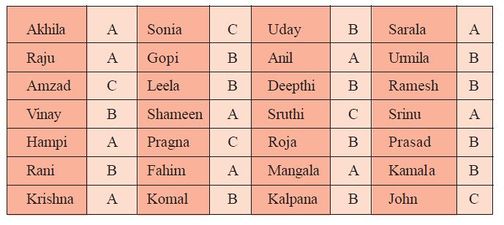
Grades of students
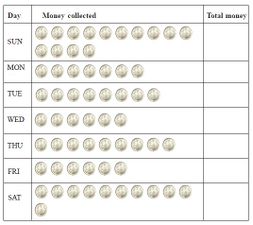
Coin collection by day
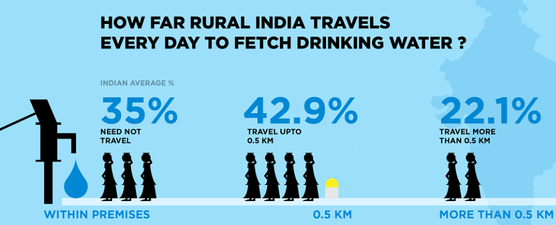
Access to water


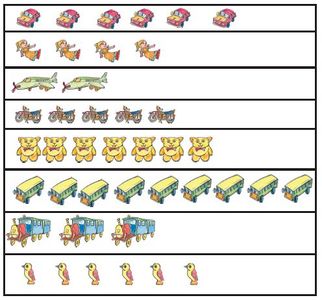
Pictograph
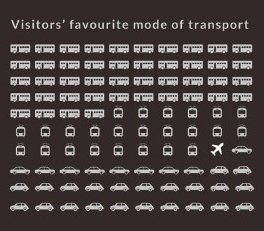
How people travel
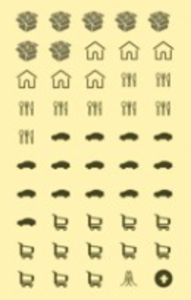
How do tourists spend
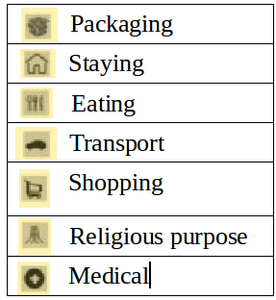
Key for pictograph


Entering given numeric data in a spreadsheet:
Look at the following data sets captured and tabulate in a spreadsheet. Plot the graph that will make meaning to the data. It could be a bar chart or a pie chart. You can see that spreadsheet offers many other types of charts. You should explore these charts for your given table of data and try to understand what they say.

India's population by religion
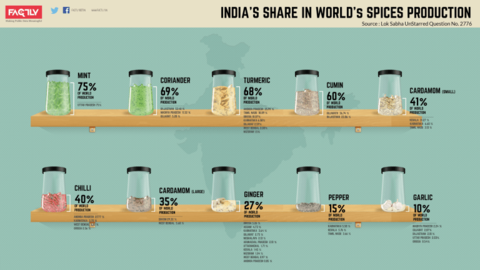
India's share in world's spices production
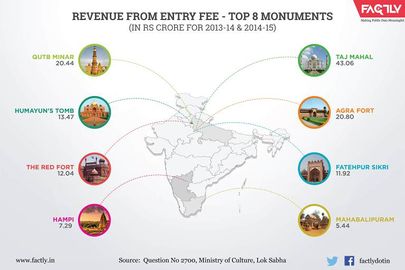
Revenue from Entry Fee from Top 8 Indian Monuments


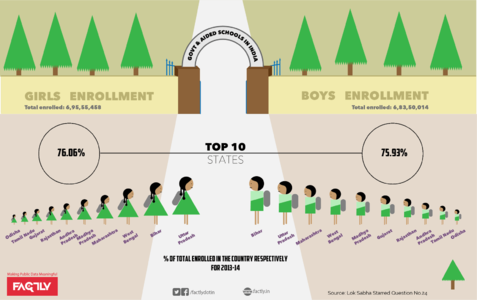
India School Enrollment Statistics
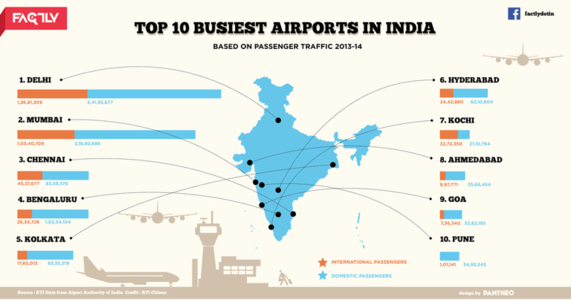
Top 10 Busiest Airports in India
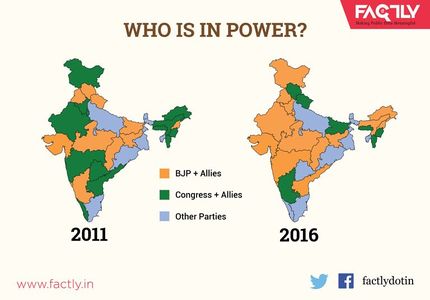
Who is in power


Tabulating collected data from previous activity on organizing data
In the previous activity on organizing data you had collected the data on various kinds of projects. You had also created a concept map and a text document describing your data collection and processing. As a part of this unit, you should enter the data you collected in a spreadsheet, sort, format and also calculate some simple measures of data. You should also add a pictorial or graphical representation of the data.
In the previous activity on organizing data you had created a text document with concept map and a written description. You can add the spreadsheet data into your document along with the charts.
Portfolio
- You will add to your folder in this activity a new data format called spreadsheets. The spreadsheets you will create will be your digital portfolio.
- Cumulative text document with spreadsheet and chart(s) inserted.