Difference between revisions of "Learn Telegram"
| Line 55: | Line 55: | ||
====Using Telegram==== | ====Using Telegram==== | ||
=====Edit, Reply, forward, Deleting the messages===== | =====Edit, Reply, forward, Deleting the messages===== | ||
| − | Telegram lets you edit your messages even after you sent the message and seen by the receiver. You can edit the message by right-clicking on the message and clicking ‘edit’. | + | Telegram lets you edit your messages even after you sent the message and seen by the receiver. You can edit the message by right-clicking on the message and clicking ‘edit’. |
| − | To reply a message, you can click reply option for the message you want to. Another simple option is double-clicking the message will indicate that you are replying to the corresponding message. | + | |
| − | To forward a message you can right-click on the message and click forward and then choose the contact you want to forward it to. | + | To reply a message, you can click 'reply' option for the message you want to. Another simple option is double-clicking the message will indicate that you are replying to the corresponding message. |
| − | You can delete the message that is sent by you. To delete any message you can right-click on the message and click delete. | + | |
| − | You can delete it only for you OR delete for the receiver OR all the participants in the group. | + | To forward a message you can right-click on the message and click 'forward' and then choose the contact you want to forward it to. |
| + | |||
| + | You can delete the message that is sent by you. To delete any message you can right-click on the message and click 'delete'. You can delete it only for you OR delete for the receiver OR all the participants in the group. | ||
=====Using emoticons===== | =====Using emoticons===== | ||
Revision as of 14:59, 10 May 2023

Introduction
Telegram Messenger is a globally accessible freemium, cross-platform, encrypted, cloud-based and centralized instant messaging (IM) service. Telegram can be used in Windows, Linux, Mac Operating systems, it also supports android and iOS platforms.
Basic information
| ICT Competency | Telegram is a cloud based messenger application. It supports synchronization, resulting as you can access your telegram account with several devices at once and share the resources. |
| Educational application and relevance | Telegram as a messenger supports to make groups thereby allowing group communication between students and the faculty. Creating a channel, conducting quiz through poll makes relates it to educational purpose as well. |
| Version | Version - 4.7.1 |
| Configuration | Telegram need to be configured by scanning the device's QR code.
It can be installed on Windows, Ubuntu, MAC OS, Android and iOS. |
| Other similar applications | Dino |
| The application on mobiles and tablets | |
| Development and community help | Telegram |
Overview of Features
With Telegram you can send messages, photos, videos and files of any type (doc, zip, mp3, etc), as well as create groups for up to 2,00,000 people or channels for broadcasting to unlimited audiences. You can write to your phone contacts and find people by their usernames. As a result, Telegram is like SMS and email combined — and can take care of all your personal or business messaging needs. In addition to this, it supports end-to-end encrypted voice and video calls, as well as voice chats in groups for thousands of participants.
Installation
For Ubuntu OS
- In case you do not find it on your computer, you can install by typing Telegram-Desktop on top search bar in Software Centre(App Grid).
- If you would like to install through the terminal follow these steps below:
- Open terminal by clicking Applications->System Tools->Terminal or through Keyboard shortcut
Ctrl+Alt+T - In the terminal window, type below command and press enter to start the installation by providing your machine password:
sudo apt-get install telegram-desktop
- Open terminal by clicking Applications->System Tools->Terminal or through Keyboard shortcut
For Windows OS
To install and use Telegram on your Windows computer, you can follow these steps:
1. Download the Windows x64 option of Telegram-Desktop version from this link
2. Now go the downloaded path on your computer and double click on "tsetup-x64..." file to begin the installation.
For MAC OS
1. Download the installation file for MAC OS from this link
2. When the download is complete, find the downloaded .dmg file and double on click it.
Working with the application
Using Telegram
Edit, Reply, forward, Deleting the messages
Telegram lets you edit your messages even after you sent the message and seen by the receiver. You can edit the message by right-clicking on the message and clicking ‘edit’.
To reply a message, you can click 'reply' option for the message you want to. Another simple option is double-clicking the message will indicate that you are replying to the corresponding message.
To forward a message you can right-click on the message and click 'forward' and then choose the contact you want to forward it to.
You can delete the message that is sent by you. To delete any message you can right-click on the message and click 'delete'. You can delete it only for you OR delete for the receiver OR all the participants in the group.
Using emoticons
Emoticons are special feature which is usually in an animated form in telegram. You can also search for a particular type of emoticon by using the expression you want to show by prefixing a colon (:) symbol.
To show a sad expression, you can type :sad in the text area, immediately you will get the emoticons that shows sad faces. Below image depicts the same.

Translating text
If you are working with multiple languages you can translate scripts to your default language in Telegram.
- Translating the text
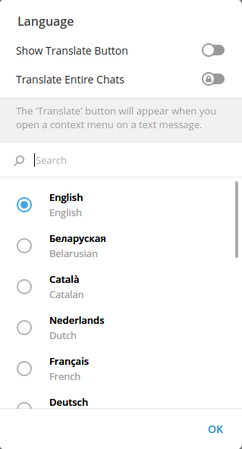
Tick "Show translate button"
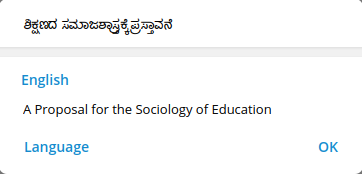
A sample output of translation


To do that, Click on three lines on top left of the telegram → Settings → Language.
Tick the “Show Translate button” → OK. Now on wards, if you receive text in any other languages that your default one, you can select the text, right click on that and click on “Translate selected text” Text which is in some other language gets easily translated with two clicks without need of external translator applications.
Voice and video calls
Telegram allows you to make a voice and video call with screencasting. It also allows to make group video calls upto 30 users to join from their device camera and the video call can be attended by 1000 people at the same time.
To make a voice or video call you can click on phone icon on the recipient’s namebox as shown in the image.
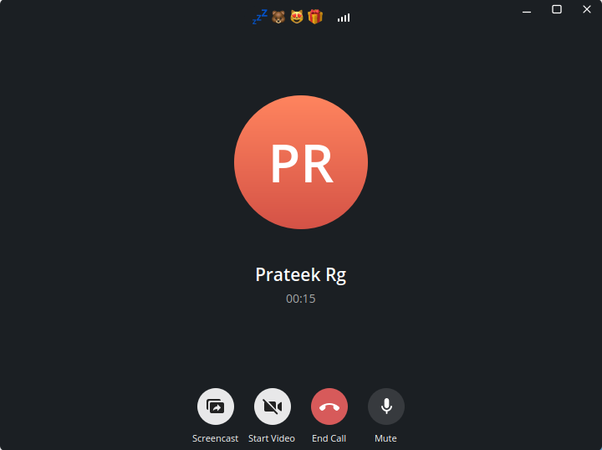
Calling interface in Telegram

Once you click on it, it will try to connect to the recipient and established a connection. Once the connection is established it gives option to switch to video call and also allows to share the screen with the users.
Creating a poll
You can create a poll in the group to collect information, opinion, decision etc. To create a poll you don’t have to have the administrator rights.
To create a poll,
Click on the group in which you want to create a poll --> Click on three dots on the right side of group name → Create poll.
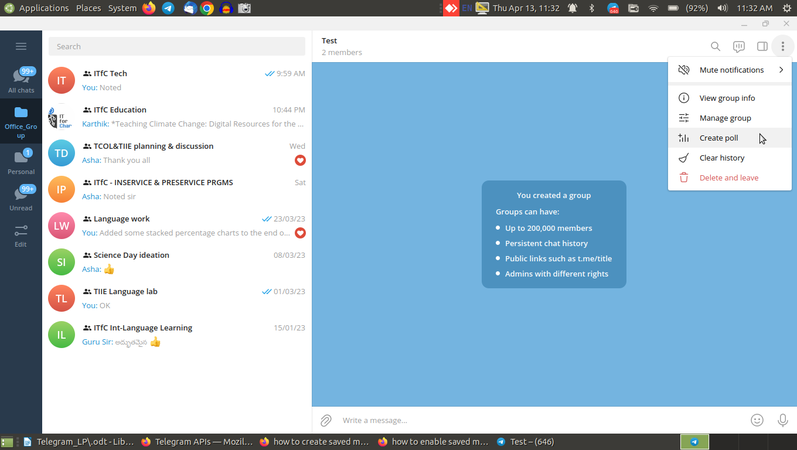
Creating a poll
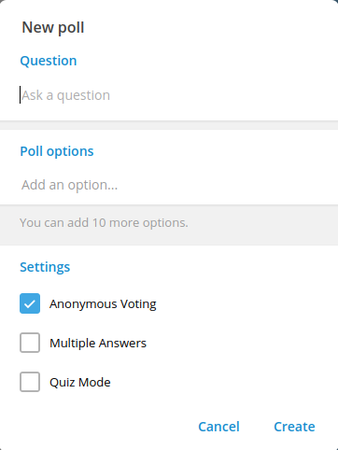
Creating a Poll : Interface


Customizing Telegram
Editing the profile
You can edit your profile based on your need.
To do that, you can click on three lines on top left of telegram → Settings → Edit Profile.
You can change your first name and last name by clicking on Name field.
You can change your contact number
You can add username for your account so that the people cannot figure out your contact number and you can be uniquely identified by your username.
Note that this will be the global username With this feature you need not be searched with your contact number.
Creating a folder
The official groups can be separated from the personal ones in Telegram. To do that we can create folders.
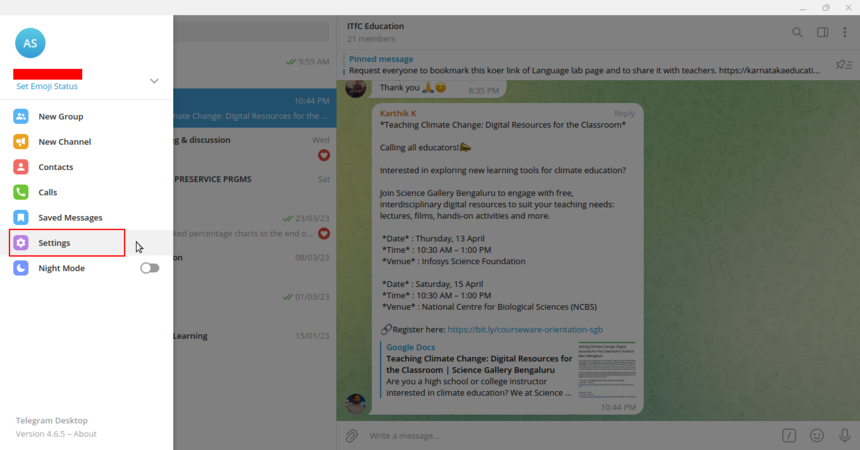
Click on "Settings"
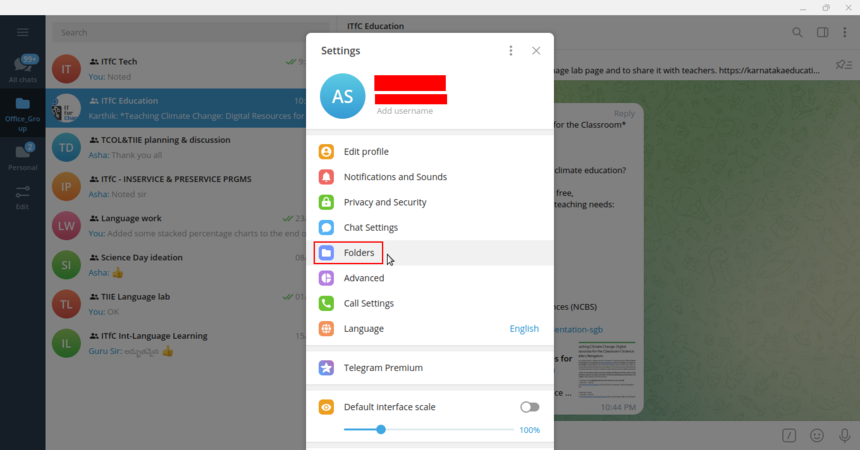
Click on "Folders"


To create a folder,
Click on three lines on top left → Click Settings → Click on Folders → Create a new folder.
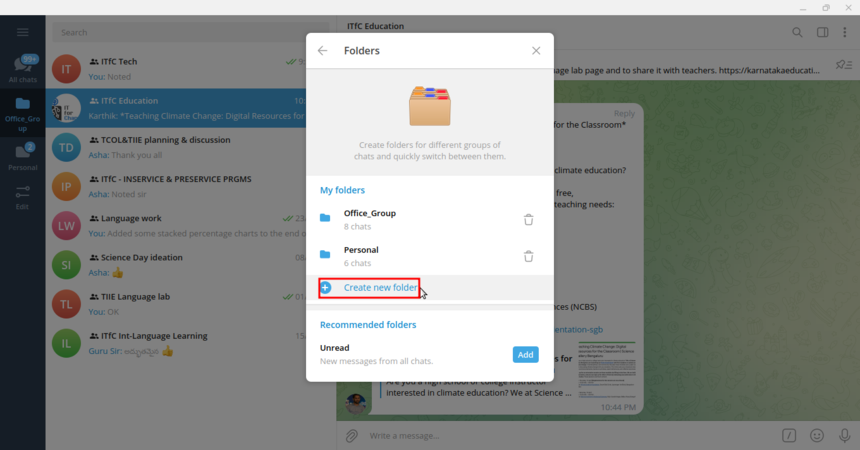
Click on "Create new folder"
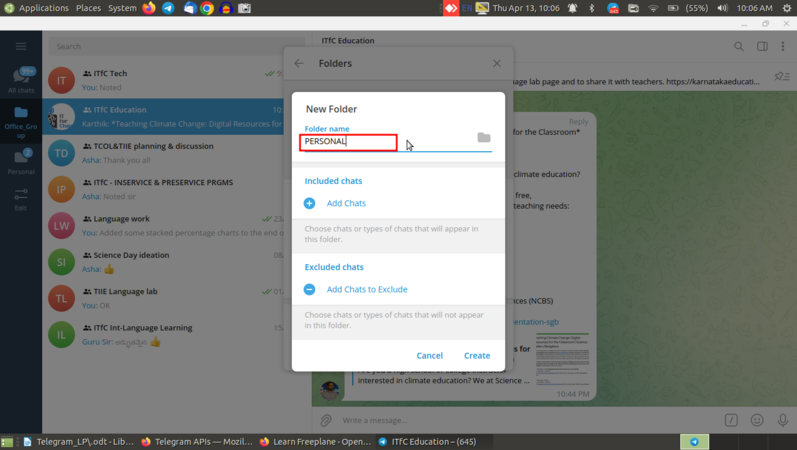
Give a folder name


You can type the folder name and choose what are the chats that you want it to appear on this folder or chats that you don’t want to appear on this folder. With these two options you can bifurcate the contacts/groups that exists in your contact.
Having an unread folder
Whenever you feel you need a separate folder for all unread messages, you can add an “unread” folder to the telegram.
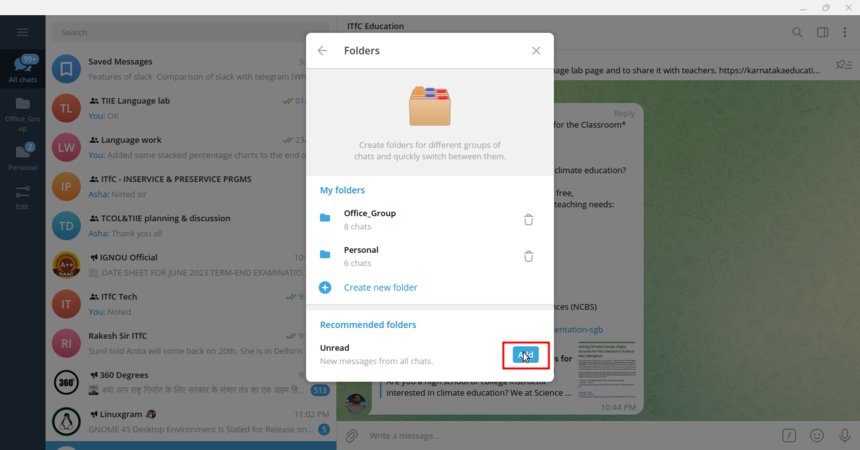
Click on "Add"

To add unread folder,
Click on three lines on top left → Click Settings → Click on Folders → In Recommended folders section there is an option to add unread. Click on that and close the window.
Creating a saved messages forum
You may have come across a situation where you want to save some particular resources for your own reference say text notes, to-do list, images, links, videos etc, but you don’t want to disturb others by sending them those. In such case you can create a “Saved Messages” by your own.
To create a saved messages forum,
Click on three lines on top left of telegram → Click on “Saved Messages”. You can use this space for yourself. This is like your personal workspace.
Changing the download path
If you want to change the download path of your telegram, you can do so by, Click on three lines on top left of the telegram → Settings → Advanced → Download path.
There will be three options for download path,
I) Telegram folder is system under Downloads directory which is the default path
II) A temporary folder that can be cleared on logout or uninstall
III) Custom folder in which you want to store your files and clear it manually.
Having a secret chat
Secret chat is a device-specific chat box which is secure with end-to-end encryption. Interesting thing in secret chat is that there is an option of self-destruct timer after which the messages disappear automatically. Secret chat option is available only on Mobile phones. To open a secret chat, Open the contacts in telegram → There will be an option say, “Create a secret chat”.
Setting passcode for telegram
If you want telegram to ask for a passcode when the system is idle after some particular time you can do so by setting up the passcode. To do that, Click on three lines on top left of the telegram → Settings → Click on Privacy and Security → Click on Local Passcode. You can enter a passcode and confirm it. You can also auto lock telegram for some specific amount of time after which your account should ask for the passcode.