Difference between revisions of "Learn Moodle"
| Line 35: | Line 35: | ||
When you forgot your Moodle ID or Password, we can reset by following the below steps in screenshots. | When you forgot your Moodle ID or Password, we can reset by following the below steps in screenshots. | ||
| + | <gallery mode="packed" heights="300px" caption="Resetting your forgotten Moodle ID or Password"> | ||
| + | File:Moodle Mobile App Forgot password Demo.jpeg|Resetting from Moodle App in smartphone | ||
| + | <gallery mode="packed" heights="300px" | ||
| + | File:Web browser forgot password.png|Click here if you have to reset your forgotten ID or password | ||
| + | <gallery mode="packed" heights="300px" | ||
| + | File:Webbrowser forgot password 1.png|Provide username or mail ID to reset | ||
| + | </gallery> | ||
==== Logging into Moodle course page ==== | ==== Logging into Moodle course page ==== | ||
Revision as of 17:33, 21 May 2020
Introduction
Basic information
| ICT Competency | Moodle is a learning management system (LMS) designed to provide educators, administrators and learners with a robust, secure and integrated system to create personalised and collaborative learning environments. |
| Educational application and relevance | Moodle provides and on-line platform for collaborative learning. It empowers teachers to set-up courses, provide learning resources and activities for the course and assess learners. Teachers and learners can share ideas and experiences using the on-line discussion forums in Moodle. |
| Version | Currently using 3.4 |
| Other similar applications | TalentLMS |
| The application on mobiles and tablets | It is a web based application, and can be accessed through a browser on any device supporting browsing.
There is also an app which can be installed on mobiles. The Moodle app is available in Google Play Store. |
| Development and community help | Moodle |
Working with Moodle
Moodle is a free and open Learning Management System (LMS). You can configure any number of courses on Moodle. You can categorise courses as required.
A course is a space on a Moodle site where teachers can add content (learning materials) and activities (pedagogy) for their students. A teacher may be a faculty for more than one course, a course may include more than one teacher and more than one group of learners.
Both teachers and students have to be 'registered' for a course (as 'teacher' or as 'student'), this role configuration is done by the Moodle administrator.
How to reset your Moodle ID password
When you forgot your Moodle ID or Password, we can reset by following the below steps in screenshots.
- Resetting your forgotten Moodle ID or Password

Resetting from Moodle App in smartphone

Click here if you have to reset your forgotten ID or password

Provide username or mail ID to reset


Logging into Moodle course page
You login to moodle through phone moodle app or through any web browser.
Logging in to Moodle course page through Web browser
Click on your Moodle course link and click on the login to view or to edit the course . https://karnatakaeducation.org.in/lms/ to view a Moodle courses managed by Centre for Education and Technology, IT for Change.
- Moodle - Login to the course
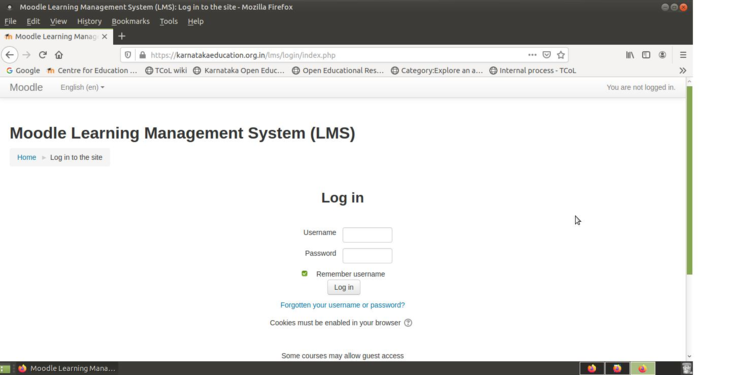
Moodle login screen
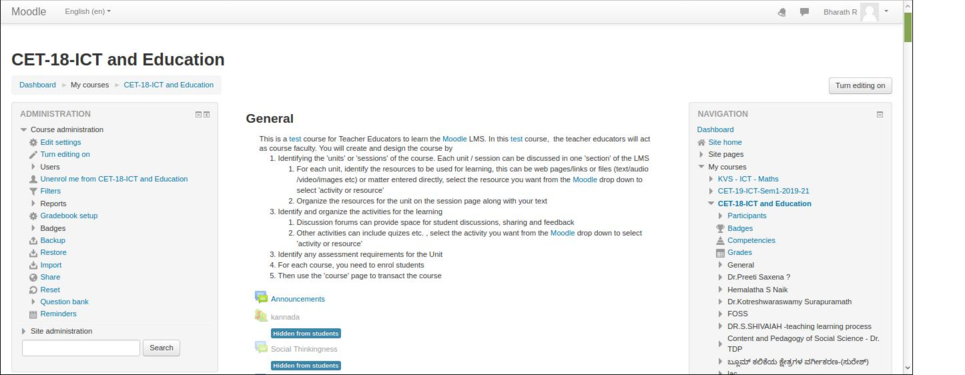
Course home page


Once you login, you can see the list of enrolled courses and you will see your login name on the top right corner of the screen.
Logging in to Moodle course page through Moodle app
- Moodle - Login to the course
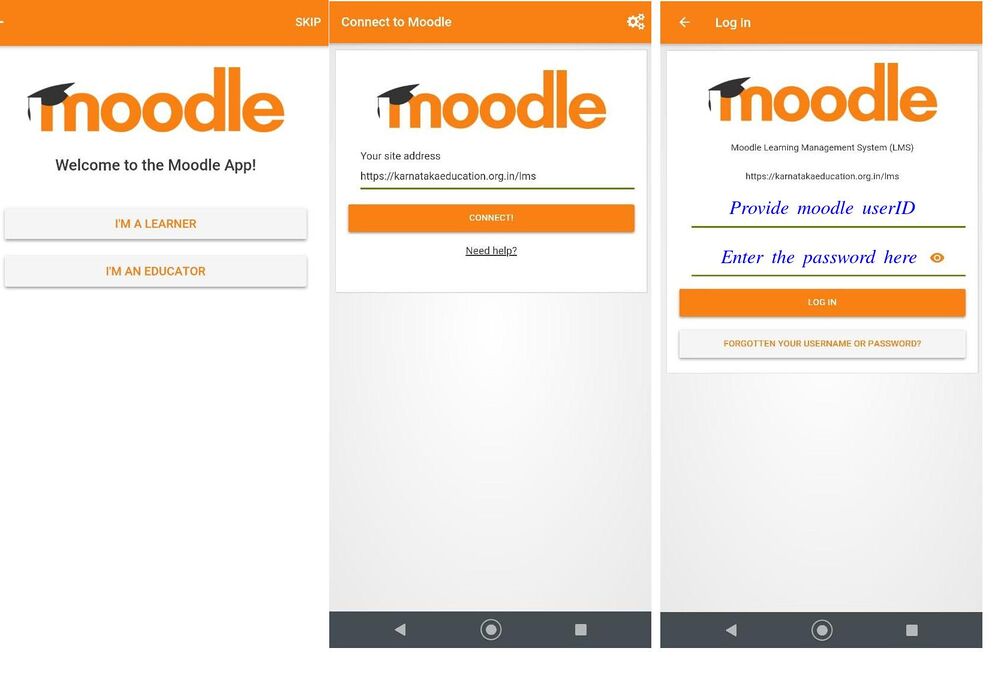
Moodle App login screen

Faculty view in Moodle
Editing sections
Once you have a new blank course or once you enrolled as teacher for any course, you can start work on it by clicking the Turn editing on button on the top right side of your screen. Only faculty will have rights to edit the course contents, including adding resources and activities. This is not available for students.
When the 'editing' option is turned 'on', each item on your course homepage and each section/block will display 'edit' option, which will enable you to perform different functions such as edit/move/copy/delete/hide.
Note: In your theme the icons may be different. However the functionality is the same for different themes of Moodle.
Once you click on edit - edit topics, it will take us to edit page (see the below screen shots).
- Moodle - editing course content sections
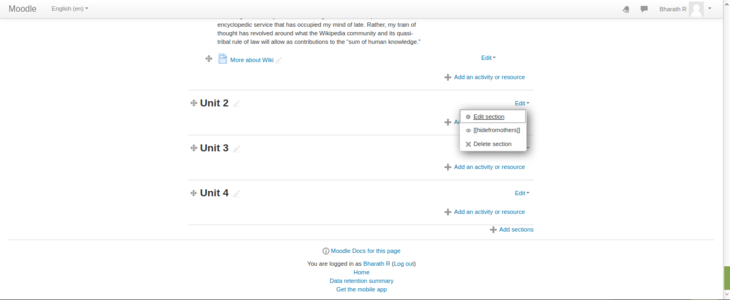
Click 'edit sections' option to start editing section
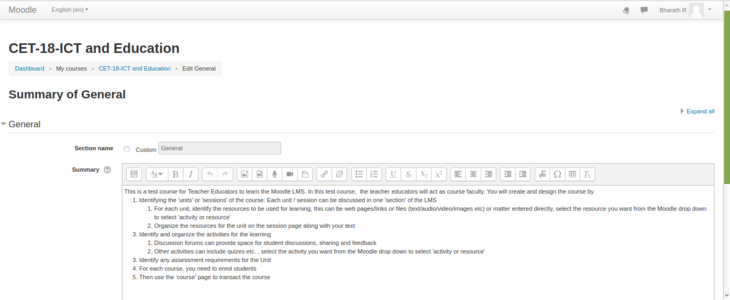
Uncheck 'Use default section name' for custom title name


You can embed your files like images or videos by dragging and dropping the file to the summary section. You can also adjust the size of the file.
Un-check "Use default section name" to give your custom heading for your section.
Start adding section summary under the summary box (you can copy paste from an existing text document also). Use the top 'basic formatting' toolbar to format your text, you can bold or italicise your text and perform basic text editing functions.
Under the restrict section, you can restrict the page to access as in the screen shot below.
- Moodle - editing course content sections

Set restrictions to access the section
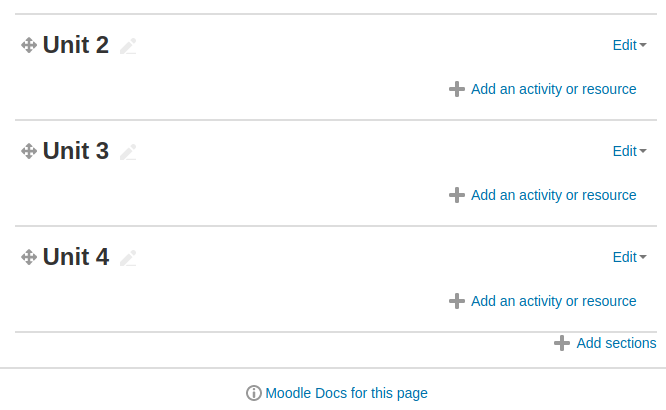
To add or remove sections


Once you have completed your editing and added the text, images, videos in the section, you should on click on "save changes" button to save your content under that section.
Scroll to the bottom of the course main page and, below the last section, look for the small + and - icons (at right). Click the plus (+)/minus(-) to add and remove sections.
Adding Resources
A resource is an item that a teacher can use to support learning, such as a file or web link. There are two ways you can add resources to the course page
Embedding the resource directly in the section
Web links can be provided directly in the section itself. You can give the link directly or 'embed' the link to existing text (which will show as a hyper link). You can also embed images and videos directly on the section page, by providing the URL where the image or video file is stored in the Moodle (using the Insert -> Media option).
- Moodle - Editing the section
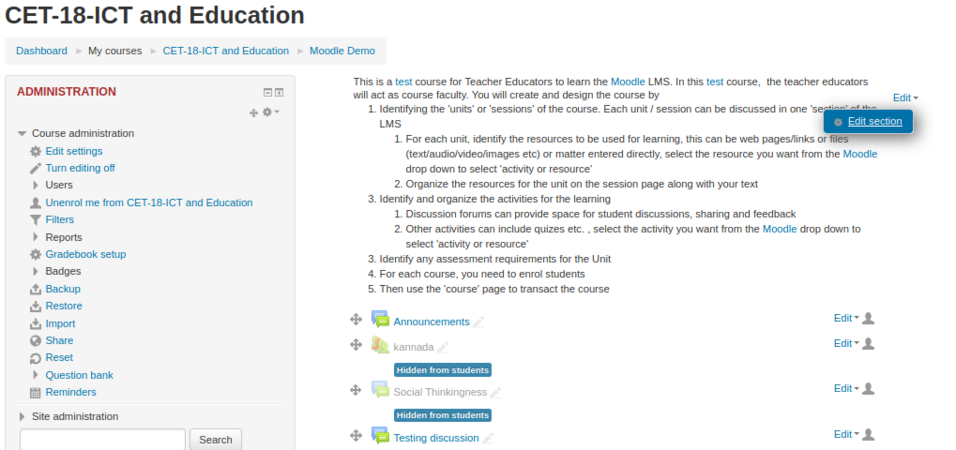
Embedding the resource directly to the section
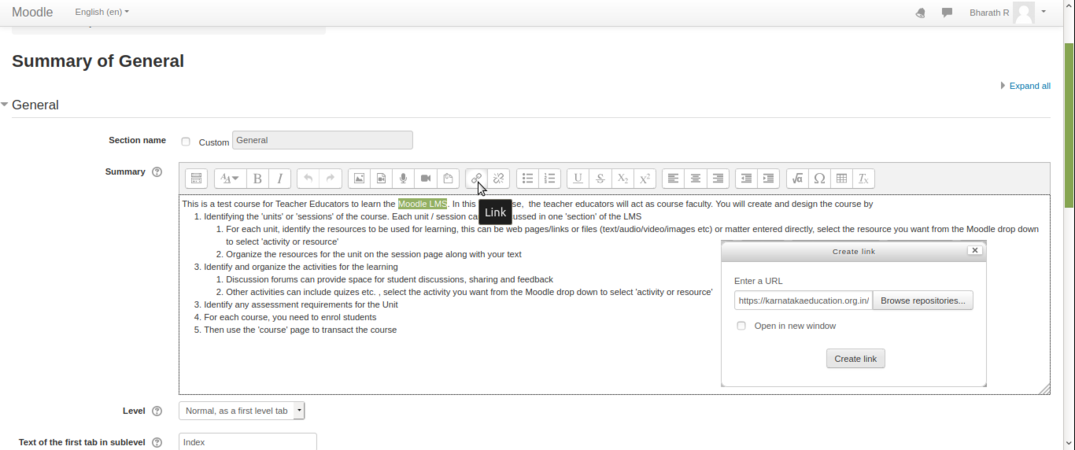
Stages on how to link external link


By selecting the words like highlighted in the above screenshot & clicking the ‘LINK’ symbol, one more ‘pop – window’ will appear where you can paste the website link for quick access while reading a particular paragraph, for the students. Above is the screenshot on how to add the “hyperlink” to particular section of “TEXT” by adding the Moodle LMS hyperlink
Adding resource to the section
To add a resources like files, folder, URLs or to create a book, choose the section in your course homepage where you'd like it to appear and click on the "Add an activity or resource" available in that section and then select the type of resources you are going to add, from the drop down list. This can be any file you have, which you will upload to Moodle and provide as a resource in this section.
After you select any resource type from the list, click on 'Add'.
In the next dialogue box you have enter the required information. See the screen shot below for details.
- Adding resources into the sections
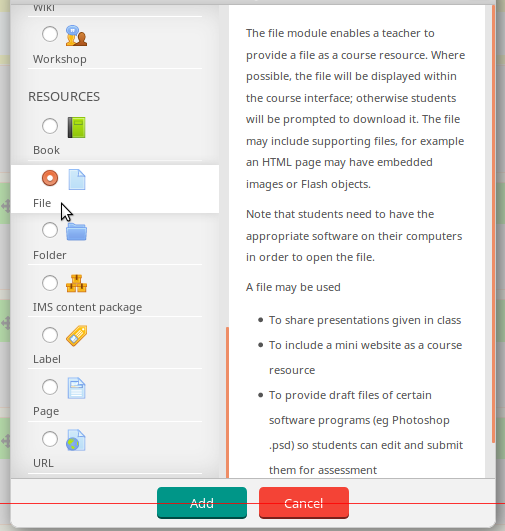
Selecting a type of resources from the list
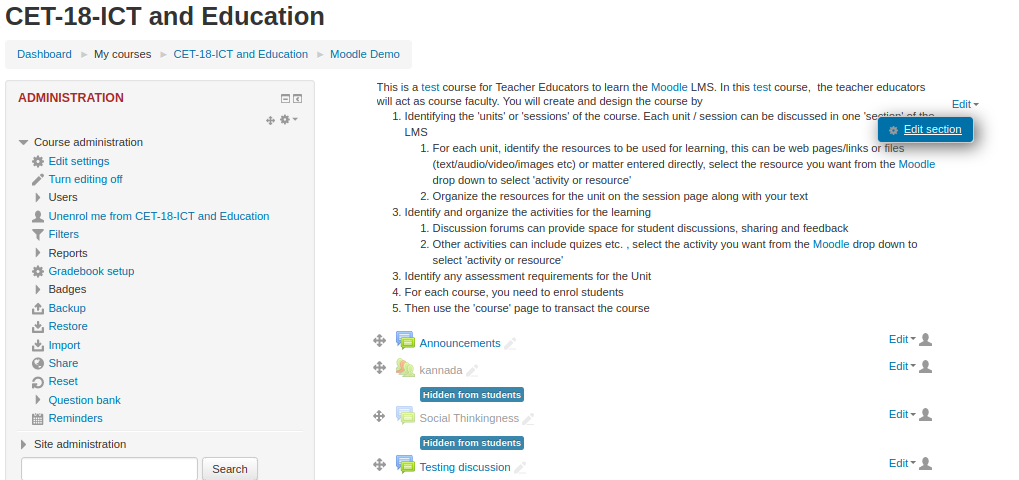
Entering basic information about the resources

- Name : Type the name for your resources link, it will create a link which students will click on to view the file. It will be helpful to give it a name that suggests its purpose / contents.
- Description : Add a description of your file here if required.
- Display description on the course page : If this box is ticked, the description will appear on the course page just below the name of the file.
- Select files : click on "Add" and use the file picker to upload your file or drag and drop your file onto the arrow if you are using an appropriate browser. Here you can also create folder and add multiple resource files to a folder. You can use folders to categories files if you plan to provide many of them for the section.
- Adding resources into the sections
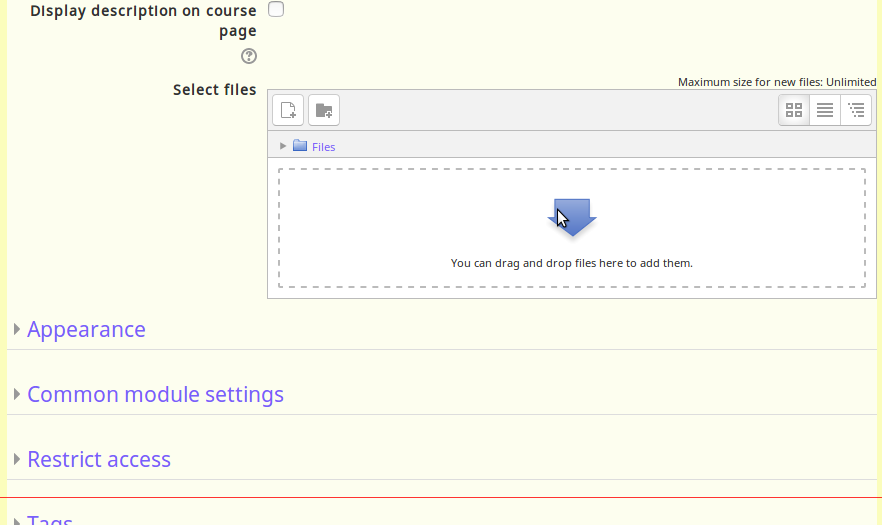
Upload files under the select file section
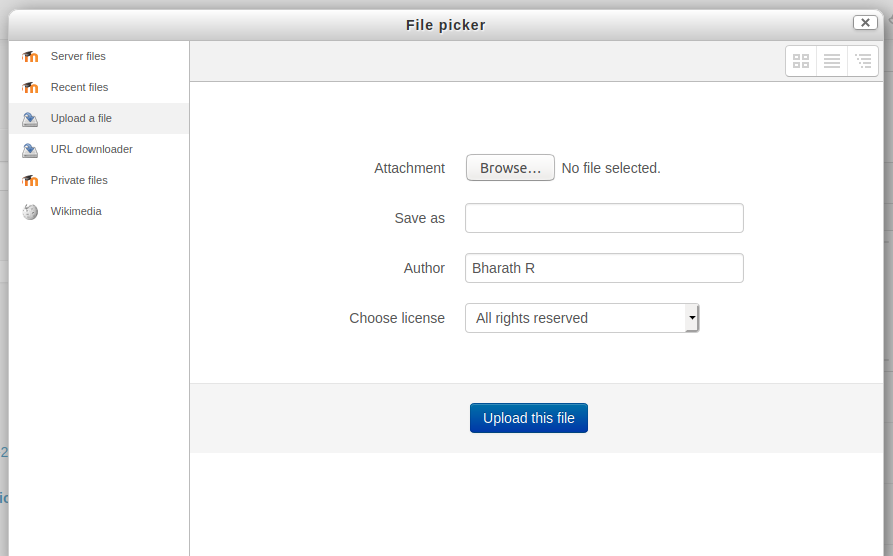
Browse your local file location


Once your browse the file then click on upload this file to upload to the page. Finally click on "save and display" to display your resources under the specified section.
Adding Activities
Moodle supports a range of different activities types that allow you to insert to any section. You can add interactive exercises for your students.
To add a activities like quiz, discussion forum, attendances, forms and surveys turn on your editing by clicking on 'Turn editing on'. Choose the section in your course homepage where you'd like it to appear and click on the "Add an activity or resource" then select the type of activities you are going to add into section from the list (for example: Quiz).
Quiz
- Adding activities
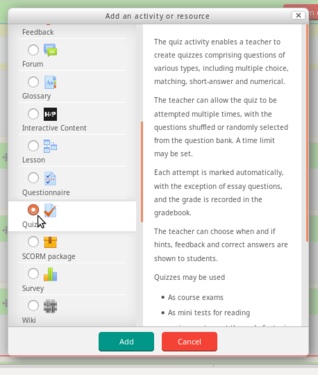
Select type of activity
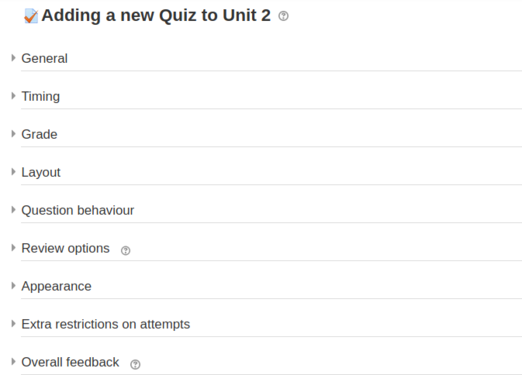
Configure your activity


After select any activity which you are going to add it to the section (for example: quiz) then click on "add". In the next dialog box will be a settings form for the activity like below.
- General
- Name : Type the name for your activity link, it will create a link which students will click on to view the file. It will be helpful to give it a name that suggests its purpose / contents.
- Description : Add a description of your file here if required.
- Display description on the course page : If this box is ticked, the description will appear on the course page just below the name of the file.
- Timing
- Open the quiz and Close the quiz : Students can only start their attempt(s) after the open time and they must complete their attempts before the close time.
- Time limit : If enabled, the time limit is stated on the initial quiz page and a countdown timer is displayed in the quiz navigation block.
- Configuring activities

Add basic information about the activities

Setting up display and submitting time


Once the all the settings has been filled out as required and saved, the activity will appear at the bottom of the section.
You can move any activity around in the course with the move buttons while in course edit mode.
Moodle supports a range of different activities that allow a student add you to insert to any section. You can add interactive questions for the other students in the course.
You can add questions by clicking on 'Creating Question', then select the type of question you are going to add into section from the list (for example: Multiple Question).
- Moodle - Creating Question
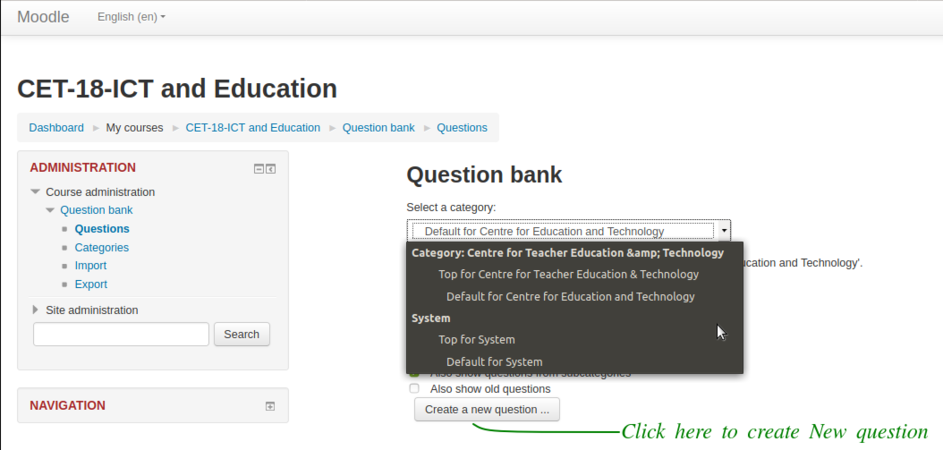
How to create a new Question
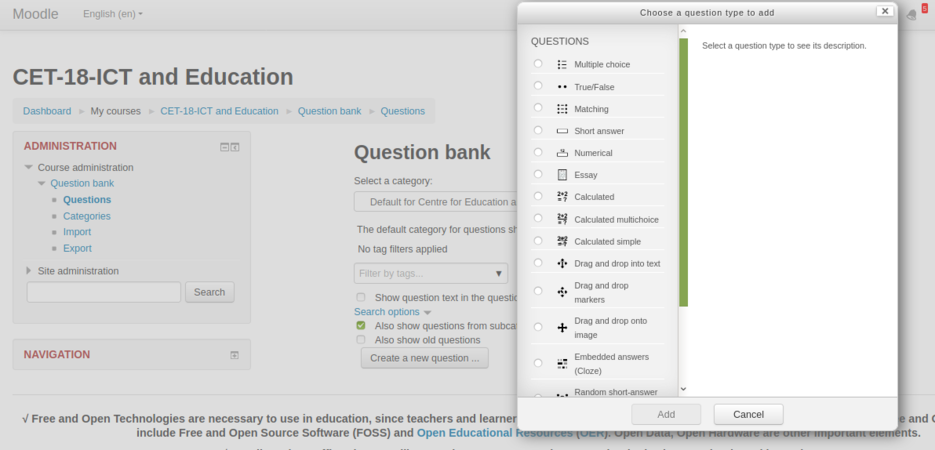
For the example we are framing ‘Multiple Choice Questions’ type.
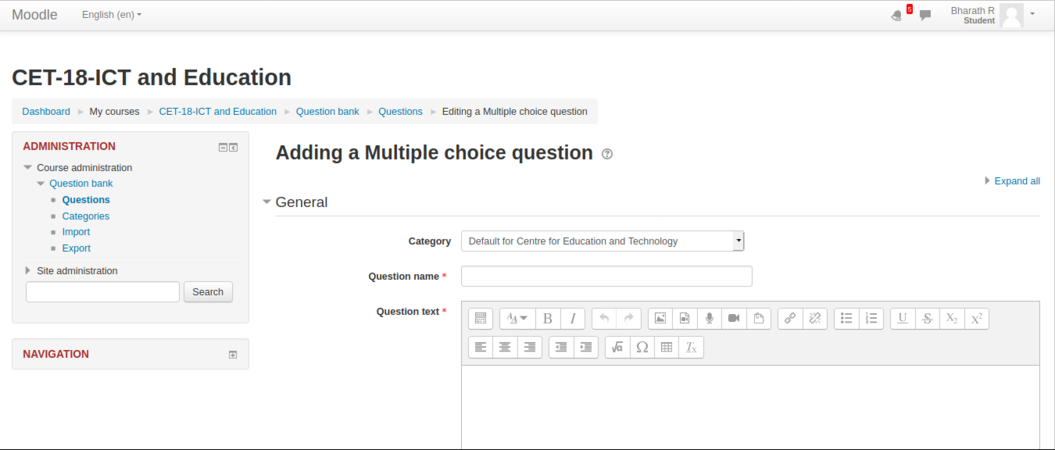
You can add the choices for the
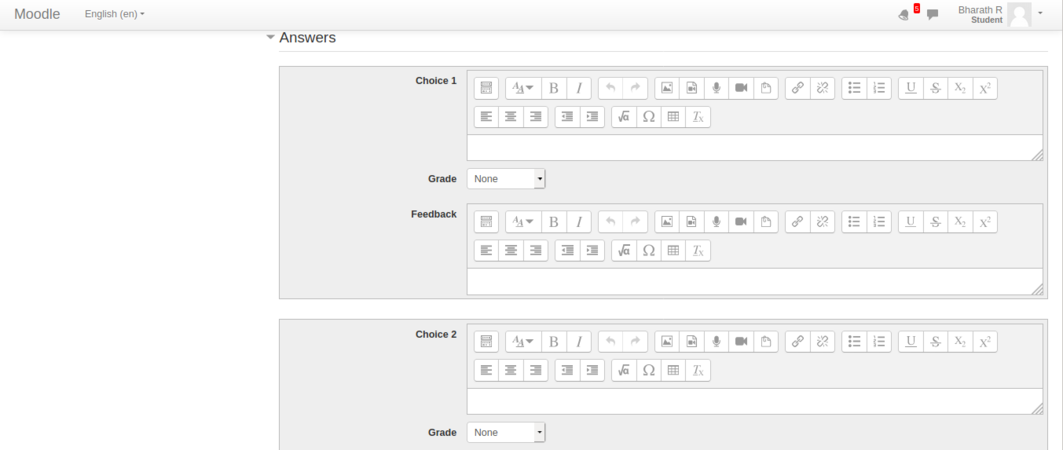
questions framed in the above screenshot.


Assignment
Assignment helps course creators to give assignments to course participants. They can submit assignments in the form of text by typing in text editor or by they can upload their digitally created content. Creators can download the submissions.
How to add an ‘Activity or resource’ By enabling the ‘Turn editing ON’ we can add ‘activity or resource’ in the units
- Moodle - How to add an activity or resource
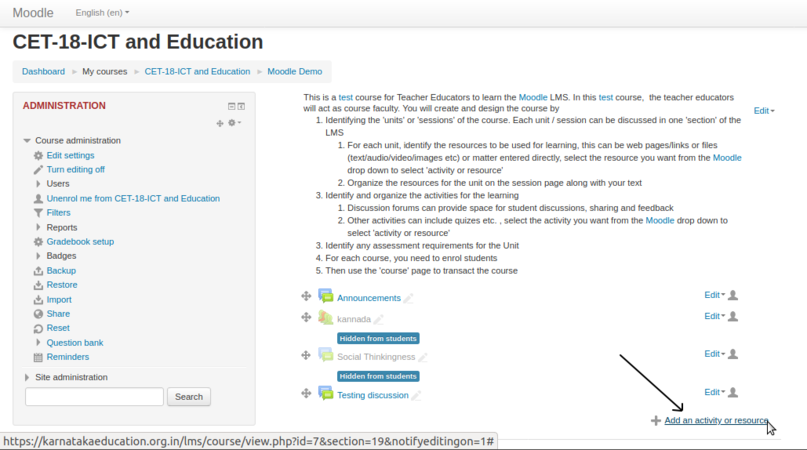
By enabling the ‘Turn editing ON’ we can add ‘activity or resource’ in the units

- Configuring Assignment
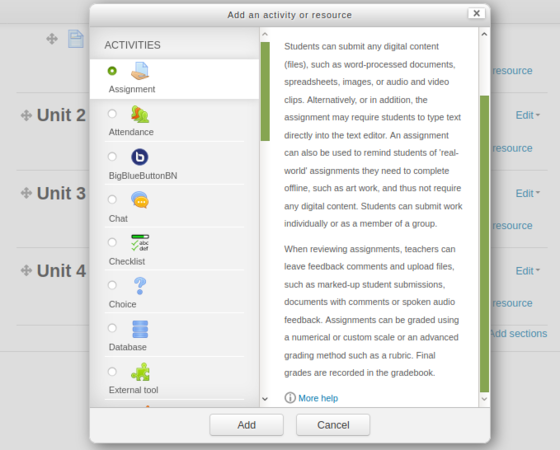
Select assignment module from activities list
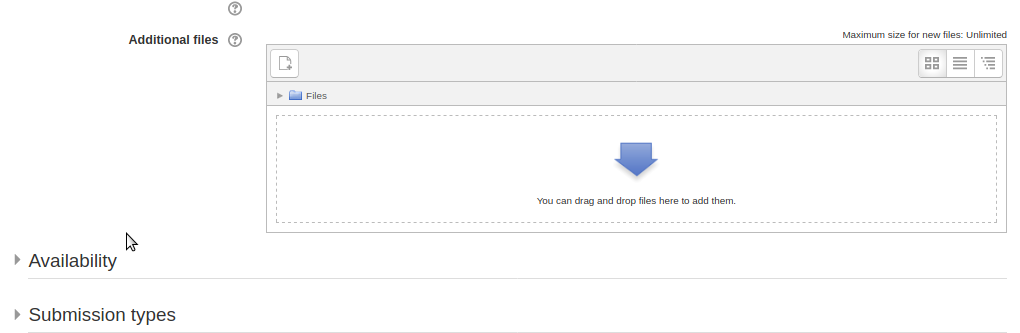
Participants can upload their files here


Forum
Forum module helps course creators to allow participants discuss about course content, resources etc and share their collective knowledge. After a participant is subscribed for a course, he/she can take part in these forums.
- Configuring Forum
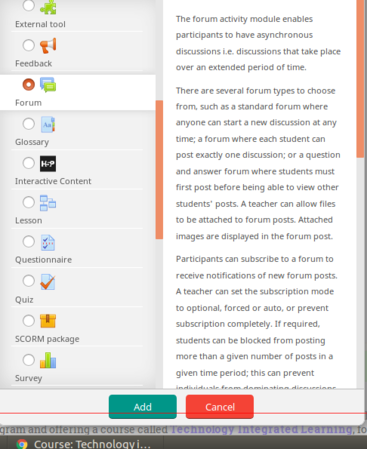
Select Forum module from activities list
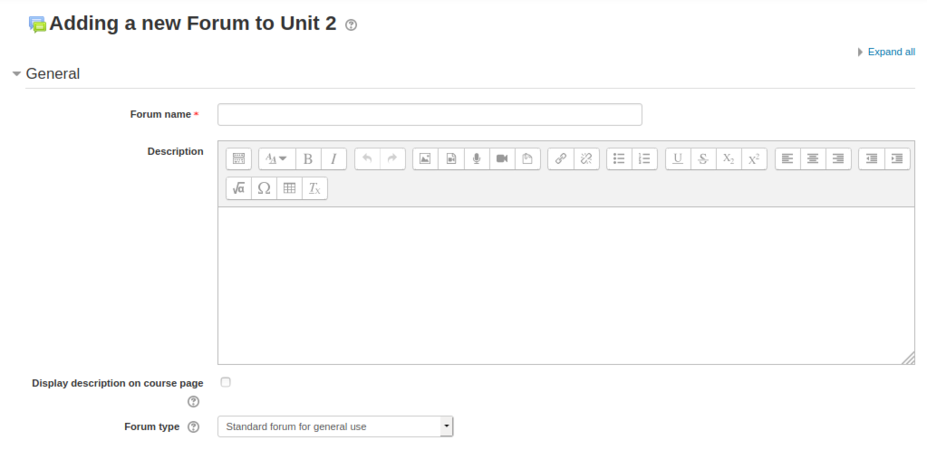
Edit these menu options to suit course needs


Also there is a control menu which enables users to participate in the forums with word count and attachment size. This will help maintain the course with optimum sized files.

Questionnaire
Questionnaire module will help course creators to give quizzes, data collection etc.
To add a questionnaire, click on Add an activity/resource and select Questionnaire
- Configuring Questionnaire
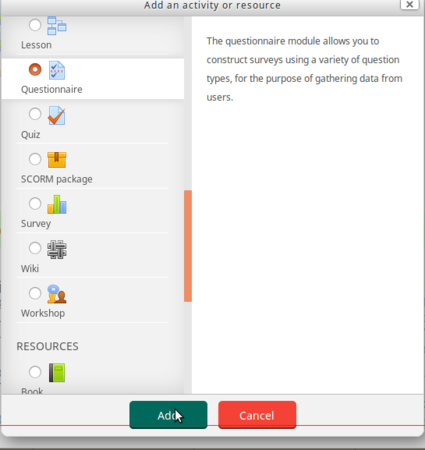
Select Questionnaire module from activities list
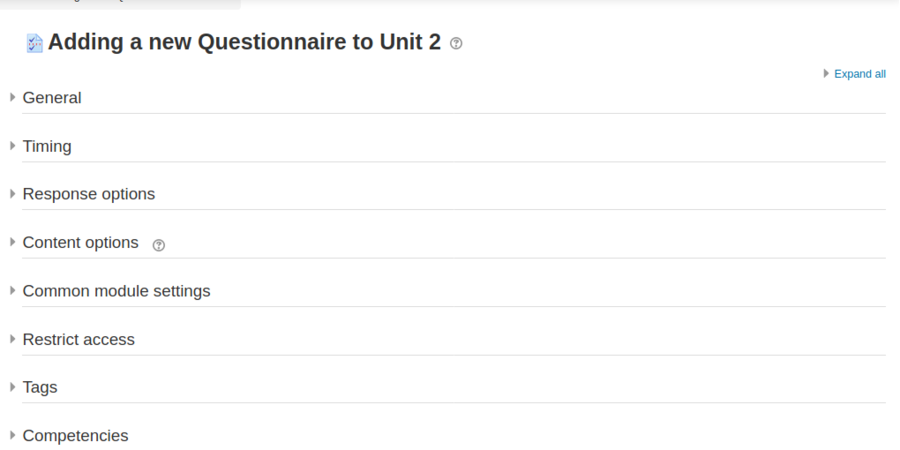
Edit these menu options to suit course needs


You can control response actions and also activity completion which gives more control to the creator/moderators.
- Configuring Questionnaire
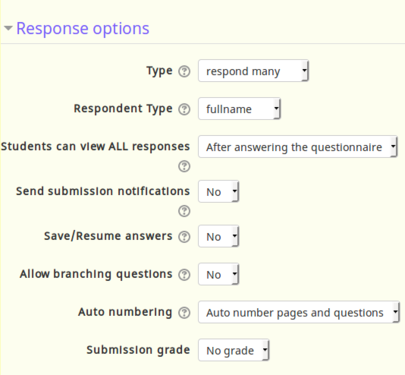
Helps to design responses better
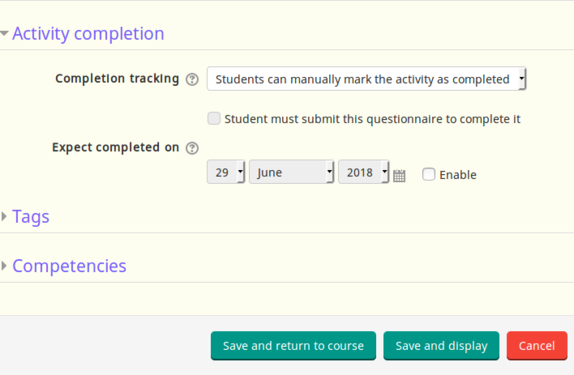
Deadlines also can be set from these menu


After you finish configuring your questionnaire, click on save and display to show the questionnaire or click on save and return to the course.
Tracking attendance
The Attendance module is designed for teachers to be able take attendance during class, and for students to be able to view their own attendance record.
A teacher can mark the attendance status of a student as "Present", "Absent", "Late", or "Excused". These status descriptions are configurable, and more can be added. The teacher adds Attendance as an activity of a course, and then sets up the sessions whose attendance is to be tracked. To create course attendance go to any section and click an "Add an activity or resource".
- Adding Attendance for the course
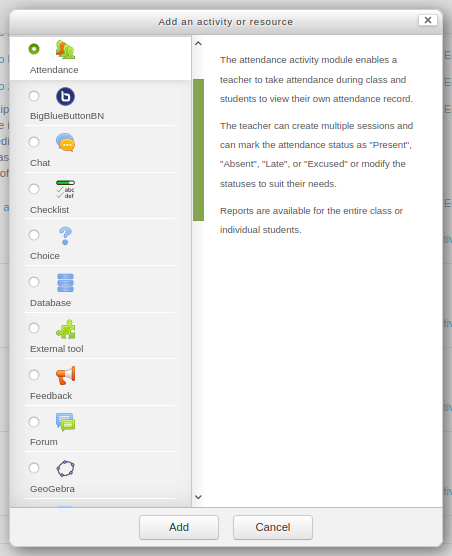
Select attendance option from the list
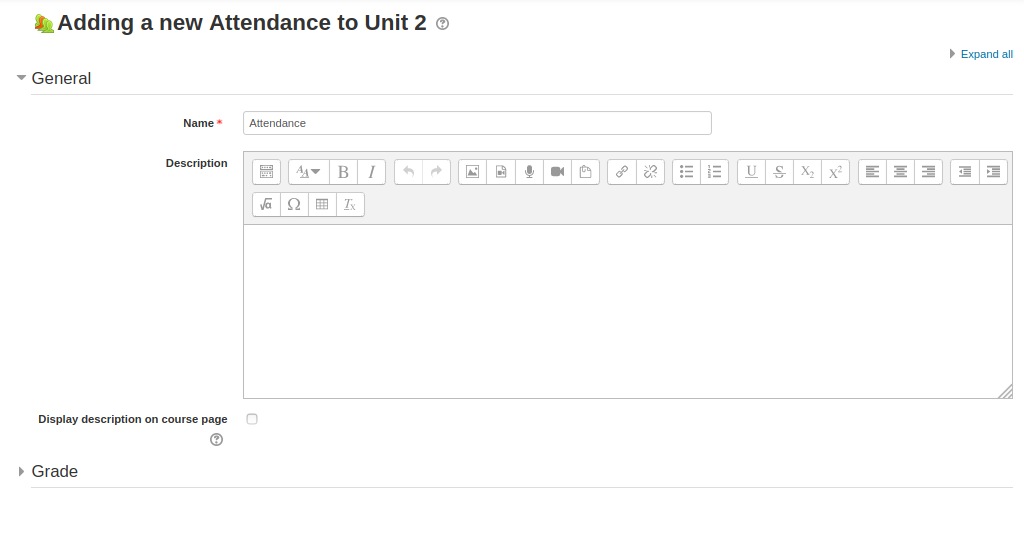
Configuring group


In the general section, Enter all the common details like Name of the attendance and description about the attendance (if you have).
Discussion forum activity
The forum activity allows students and teachers to exchange ideas by having discussions on any topic. Any teacher or student registered for the course can post comments, to initiate a new topic, or respond to available discussions on any topic. The discussions for a topic are automatically shown as as part of a 'thread' by Moodle.
There are several forum types to choose from, such as a standard forum where anyone can start a new discussion at any time; a forum where each student can post exactly one discussion; or a question and answer forum where students must first post before being able to view other students' posts. A teacher can allow files to be attached to forum posts. Any images attached in the forum post are displayed.
Discussion forums have many uses, such as
- A social space for students to get to know each other
- For course announcements (using a news forum with forced subscription, where only faculty can post)
- For discussing course content or reading materials
- For continuing on-line an issue raised previously in a face-to-face session
To add discussion topic click on the add "an activity or resource" option and select forum option from the activities list.
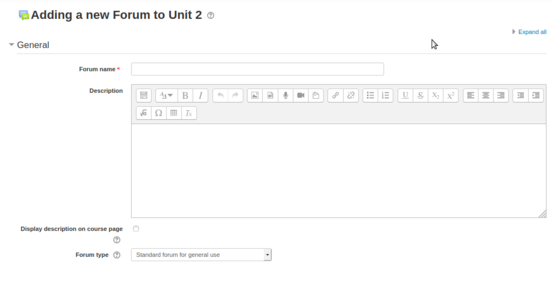
Enter the discussion topic and summary
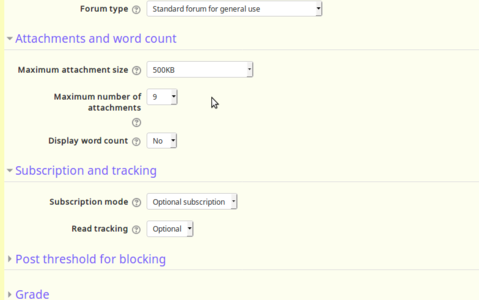
Restricting attachment size and text length


Under the "general" section type your discussion topic and under the "attachments and word count" you can limit the size of the attachment and word counts and number of attachments etc.
After you completes the editing, click on "Save and display" to display third discussion thread under your selected section.
Students can start replying to a topic / discussion by simply clicking on the 'reply' option.
Advanced Activities
1.Check list
2.Chat
3.Lesson
4.Workshop
Multi-lingual offering of courses
The multi-language content filter enables resources to be created in multiple languages. Moodle by default language will be in English and for running any local languages, language packages need to install in your server (This will be done by your web admin).

Login to your course and on the top right side of the screen you can select the language which you want see your course.
Adding content in the course page
For adding other language content into any section, after you enable the editing option and select click on edit -> edit topic.

Once the section open with edit option, for adding Kannada text in to the section just add {mlang kn} ('kn' means Kannada, replace this with your language) before your text began and at the end of your text just add {mlang}. follow the same steps for any other language which is already installed in your moodle server.
How to add a new course
If a faculty wants to add/create a ‘New course’ to the Moodle page below are the steps.
1. Teacher’s Dashboard ►Site administration ►Courses ►Manage courses & categories►Create a new course.
- Moodle - How to add a new course
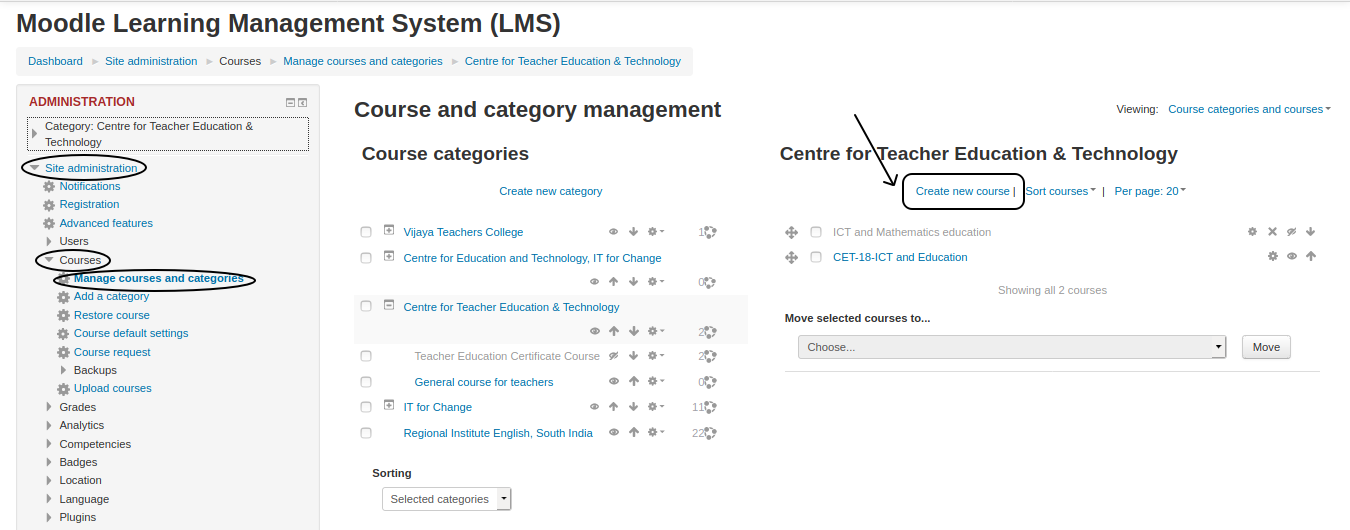
Steps on how to add a new course

Student view in Moodle
This page will help you to navigate around your course as student. Once faculty enrol you to a course, you can browse all the the course content from the moodle site.
Student/User information

Most courses will allow the student to see profile of the login user from the top right side. This block will allow the student to see information about themselves in the course.
In the main page, you can see the two columns: Navigation, Course contents with course sections and news, and upcoming events. You need to click on each tab to see more information.

Once you click on the course, The course will open and from the left side course navigation option, directly you can go to any section in the course.
Click here to see the tutorial on how access course content from moodle mobile app.
Participating in activities
Under every section of the courses, faculty will give some activities to be completed by students. Activities may be quizzes, assignments, checklists and also discussion topics. Click on the activity to participate in it.
Participating in assignments activity
If the activity is assignments, you have click on the title of the activity to read the full assignment and click on "add submission" it will open "online text section" and "file submission" sections, under online text section directly you can give text input of your assignment. In file submission section you can upload any files like images, text files, audio’s etc.
Participate in discussion forum
Under the first general section you have to click on the "General discussion forum for faculty and students" link to see all the discussion topics. To reply to any topic, click on the topic and type your reply by clicking on the reply link under others replies. Under every reply text input box, also it will allow you to upload your files if needed.
- Participate in the discussion topics
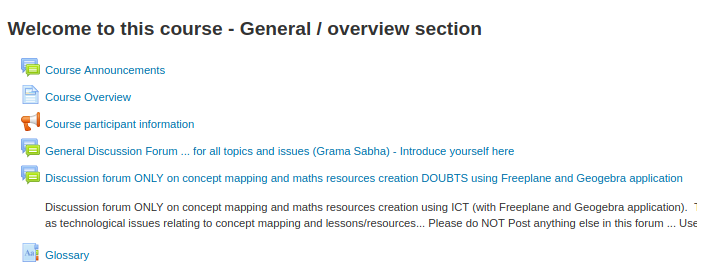
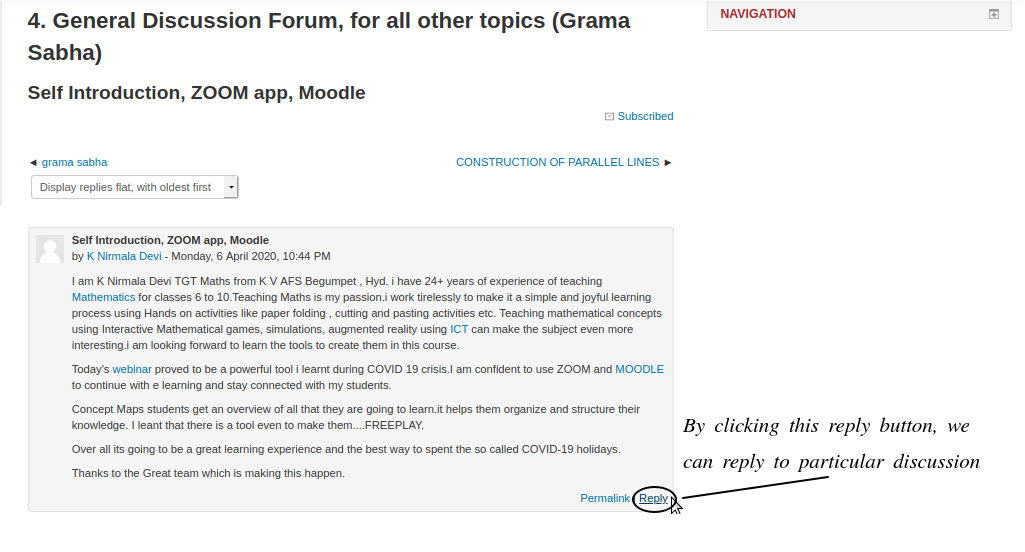


Addition to the existing topic, you can create new discussion topic by clicking on "Add a new discussion topic".
Also, click here to see the video tutorial on how to participate in discussion forum in mobile app.
- Participating in assignments activity
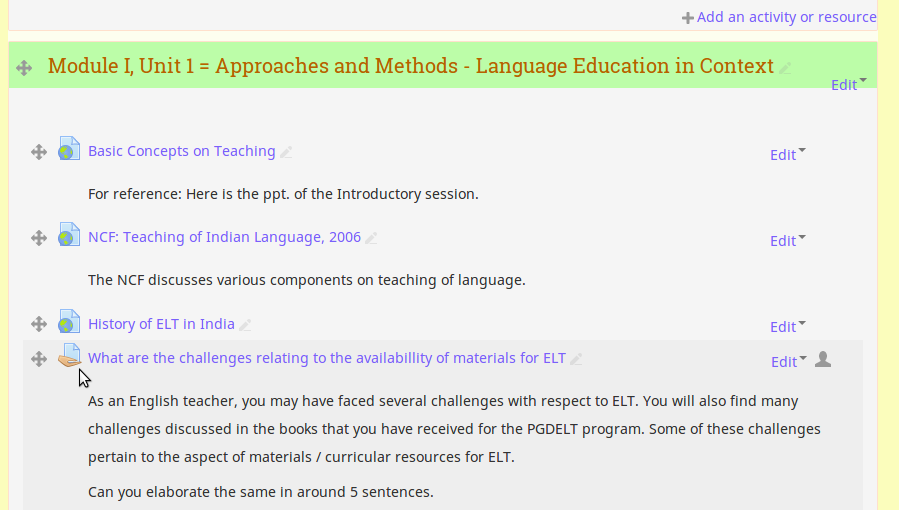
Participate in assignment activity
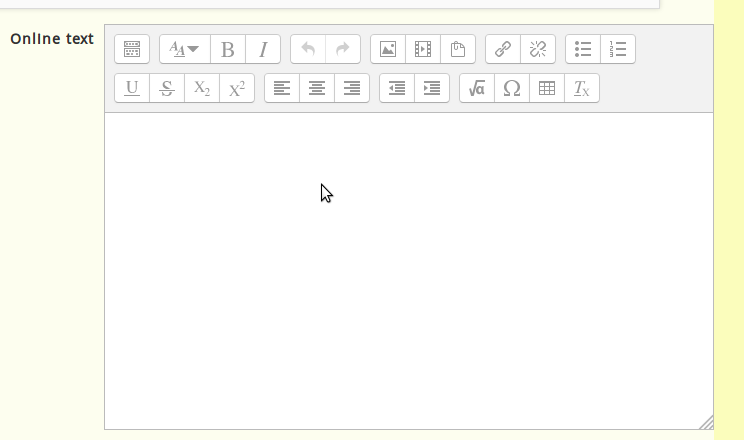
Online text input section
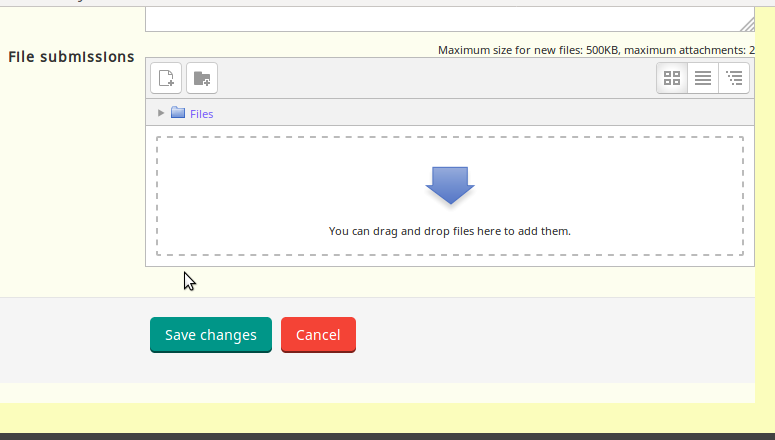
File submission section


In this course you can upload upto sizes 500KB file as assignment, If you want to upload files which is more than 500KB, you can use google drive to upload your file and give the link here under online text input section. Once you finish your inputs click on "Save changes" to submit your assignment.
Note : - If you want submit any of the video you have created, use Youtube to upload it and give the video link under online text input section.
Click here to see video about assignment submission on moodle mobile app.
How the student can access the resource
The students can access the resources which is posted by the teacher & is given permission for downloading to the students.
- Moodle – Accessing the resource
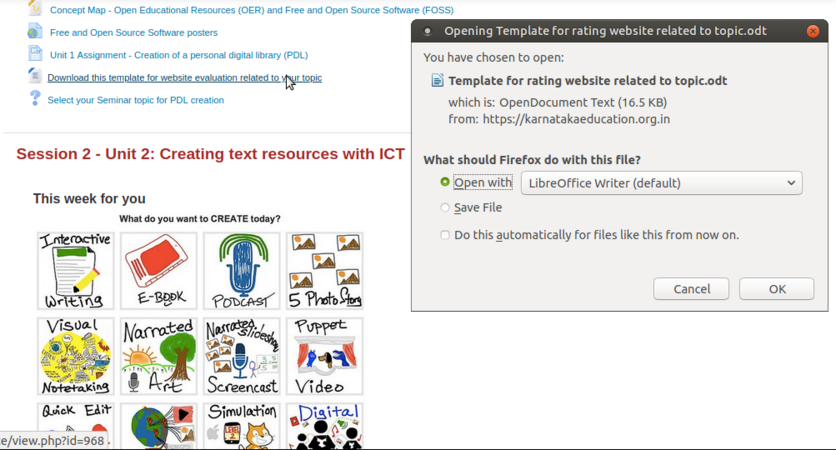
In the above screenshot we are trying to download a file which is uploaded by the teacher for the student.
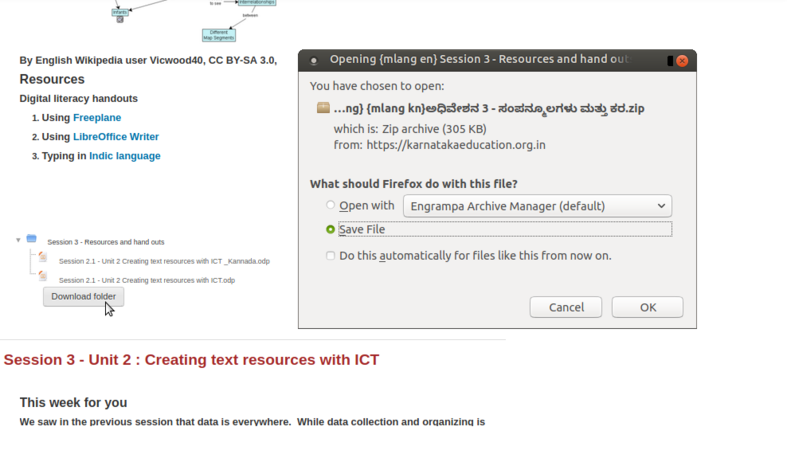
Here in the above screenshot, we can download a whole folder which is uploaded & given access to download for the students.


Install Moodle app on your phone
Moodle is a free application and it is available for smart phone, download Moodle from google play store.
- After downloading the "Application" just we need to follow the steps & install the Moodle App in our smartphone.
- When the installation is complete login to the "App" through the "Moodle ID" & "Password" provided.
Advanced features
- Tracking activities of students
- Tracking assessments and grading assessments
- Quizzes for ongoing assessment
- Event tracking using calendar