Difference between revisions of "Learn Google Drive"
| Line 105: | Line 105: | ||
| [[File:How_to_share_google_drivefolders_and_files_with_others11.gif|link=Special:FilePath/How_to_share_google_drive_folders_and_files_with_others.gif]]||[[File:How_to_share_google_drivefolders_and_files_with_others_through_phone22.gif|400px]]|link=Special:FilePath/How_to_share_google_drive_folders_and_files_with_others_through_phone2.gif]] | | [[File:How_to_share_google_drivefolders_and_files_with_others11.gif|link=Special:FilePath/How_to_share_google_drive_folders_and_files_with_others.gif]]||[[File:How_to_share_google_drivefolders_and_files_with_others_through_phone22.gif|400px]]|link=Special:FilePath/How_to_share_google_drive_folders_and_files_with_others_through_phone2.gif]] | ||
|} | |} | ||
| − | |||
| − | |||
| − | |||
====Advanced features==== | ====Advanced features==== | ||
Latest revision as of 12:41, 11 April 2023
Introduction
Google Drive is a cloud storage service that lets the user to store documents, images, audio, videos, as files and even inside folders. It requires the user to have a google account to use this service. Google drive can be used in windows, ubuntu or any other operating system including on android phones.
| ICT Competency | Google Drive is a application for storing and accessing resources. |
| Educational application and relevance | You can store all your data here by uploading existing file and folders, also can create new files and folders. And you can share your data with your peers to view, edit and comment. |
| Version | Version - Not Applicable |
| Configuration | No specific configuration requirements but Internet connection is needed to use this application. |
| Other similar applications | Nextcloud Dropbox |
| The application on mobiles and tablets | Android phones will have in-built Google Drive option. You need to switch on the synchronizing option to get all your mobile camera photos to upload to your google drive photos automatically. This enable all your important event photos will be saved safely in Google Drive. |
| Development and community help |
Overview of Features
- Google allows 15GB of free Google online storage space on cloud, this includes your photos (Google photos), emails (Gmail), stories, drawings, recordings, video (Drive files).
- Your files in Drive can be accessed from any smart phone, tablet, or computer.
- You can invite others to view, download, and collaborate on all the files of you.
Installation
It is a web based application, there is no installation needed. To access google drive, you have to sign in to Google site by using your google login details.
Working with the application
Accessing Google Drive
- The below images show you how to access Google Drive. You need to access a browser (Mozilla Firefox) for this. On your computer with Ubuntu custom distribution, to open web browser go to (Applications → Internet→ Firefox web browser), as shown in the first image.

Opening a browser
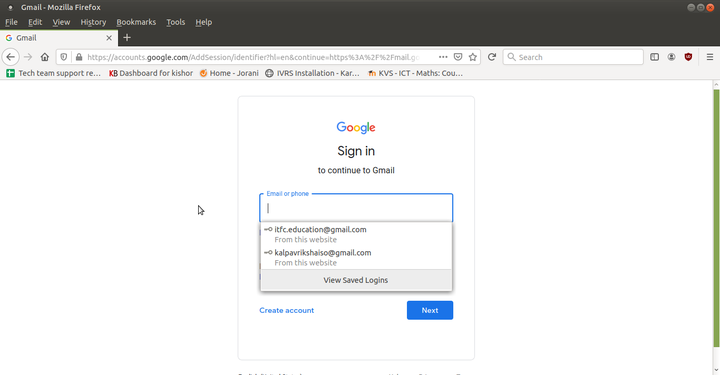
Login to Gmail account


2. If you are using windows or any other operating system open web browsers like Google, Mozilla, Safari etc…
3. You have to sign in to google site by using your Gmail user (email) ID and password.
4. The google drive page will open and will look like the below image.

Google Apps, select Drive
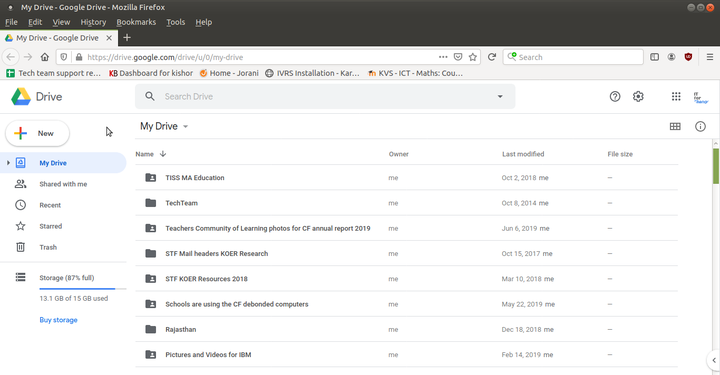
Google Drive main page


Creating / uploading and sharing files and folder
Create your local files or folders to Google Drive
- Click on “New” icon on left side of the screen.
- If you want to create a folder, click on "Folder" --> Give folder name --> Click on "Create".
- Inside this folder, you can create new files such as documents, spreadsheet and slides. Google Drive has Open Document Format (odt, odp, ods) viewer and can open any .odf files, doc, docx, xls, xlsx, ppt, pptx are the supported file formats.

Creating new folder

Upload your files to google drive
- To upload your local files, click on "new" --> select "file upload" -> select file -> click open.
- This upload time is completely depending on your file size, once it uploads it will show you the right mark (green colour).
- Google drive will allow you to upload any kind of files like image, audio, video, text files etc.
Upload your folder to google drive
- To upload your local folder, click on "new" --> select "folder upload" --> select folder --> click open.
- By doing this you can directly upload folder from local storage.
Sharing your google drive files and folders
In google drive you can share your folder/files in two way:
Use this method when you know the email address of everyone with whom you are sharing.
Right click on the file/folder --> click on 'Share' --> in the pop-up window, Under 'share with people', type the email address of the person or Google group you want to share with, copy the link by clicking on "copy link" button.
Use this method when you don’t know everyone’s email address, aren’t sure if they all have a Google account, or simply want a document to be more widely available.
1. Right click on the file/folders which you are going share, select on "Share"

Right click and select get sharable link

2. In the pop-up window, under "Get link" option, Click on "change" (to decide what people can do with your file when you share it), select Viewer or Editor. Choose "viewer" option to only make them access your files. Choose "Editor" option to give them the rights to modify your file/folder.

click on change option under get link

3. Click Copy link --> Done.
4. Copy and paste the link in an email or any place you want to share it.

Copy your google drive file link

You can share your google drive folders and files using your computer browser or mobile app.
| Through computer browser | Through Google drive mobile app |
|---|---|
 |
 |link=Special:FilePath/How_to_share_google_drive_folders_and_files_with_others_through_phone2.gif]] |link=Special:FilePath/How_to_share_google_drive_folders_and_files_with_others_through_phone2.gif]]
|
Advanced features
- You can create simple drawings on "Google Drawing Page".
- You can allow others to access your documents ('sharing' documents with them) and give their comments and feedback.
Ideas for resource creation
All the documents like photos , important files and text resources can be saved in the drive. You can share these resources with your peers to view, edit and comment to make it more effective.