Difference between revisions of "Learn Kazam"
| Line 58: | Line 58: | ||
When user launch the application, user will notice that in addition to recording screencasts, user can also use the application to take screenshots, by switching to it at the top. | When user launch the application, user will notice that in addition to recording screencasts, user can also use the application to take screenshots, by switching to it at the top. | ||
| − | <gallery mode="packed" heights=" | + | <gallery mode="packed" heights="250px"> |
File:Kazam home page.png|Selecting screenshot option | File:Kazam home page.png|Selecting screenshot option | ||
File:Delay count down.png|Delay count time for taking screenshot | File:Delay count down.png|Delay count time for taking screenshot | ||
| Line 70: | Line 70: | ||
'''NOTE:-''' ''<u>These options are same for both Screenshot and Screencast.</u>'' | '''NOTE:-''' ''<u>These options are same for both Screenshot and Screencast.</u>'' | ||
| + | |||
==== Saving and exporting ==== | ==== Saving and exporting ==== | ||
[[File:Choose lacation to save your screenshot.png|left|thumb|390x390px|Choose location to save your screenshot]] | [[File:Choose lacation to save your screenshot.png|left|thumb|390x390px|Choose location to save your screenshot]] | ||
Revision as of 17:26, 2 August 2017

Introduction
Basic information
| ICT Competency | Kazam is an Free and Open Source application and this tool can use it as both screencasting tool and for taking screenshot of your computer screen. screencasting: digital recording of computer screen output, also known as a video screen capture, often containing audio narration. |
| Educational application and relevance | Creating video and image resources, combining audio, text, image, video and dubbing audio of any video. This can be used in digital story telling activities |
| Version | kazam 1.4.5 |
| Other similar applications | RecordMyDesktop, Simple screen recorder |
| The application on mobiles and tablets | There are many similar application are available in android mobile phones. Example,. AZ screen recorder |
| Development and community help |
Overview of features
Installation
- The application is part of the Ubuntu custom distribution.
- In case you do not find it on your computer, you can install by choosing “kazam” in Ubuntu Software Centre
- If you would like to install through the terminal follow these steps below:
- Open terminal by clicking (Ctrl+Alt+T),
- Once Window page is open, in front of dollar($) symbol just type below command.
- sudo apt-get install kazam
- just type your password(it will not display on your screen), press Enter.
Working with application
Use Print Screen
This is the most common method to take Screenshot. Pressing the “Print Screen” button will take the Screenshot of the “Entire Visible Screen”.
Getting familiar with application
When we open the Kazam we will see this main window. This main window contains the following sections. Open application from Applications--->Sound and Video--->Kazam.

- Screencast : This option is to set the screen-casting
- screenshot : This option is to set the screenshot
- Fullscreen : From selecting this option, we can able to screencast/screenshot of complete screen of your computer screen.This mode is useful for creating tutorials where you need to show the interaction between the desktop manager and the different windows and applications.
- Window : From selecting this option, we can able to screencast/screenshot of only current window of your computer screen. This mode which records only a particular window and is ideal for recording screencasts of an application.
- Area : From selecting this option, we can able to screencast/screenshot of only selected area of your computer screen.
- Mouse cursor : Select this feature for including cursor point into our screencast/screenshot output file.
- Sound from the speaker : Select this feature for adding speaker output audio with our screencasting.
- Sound from microphone : Select this feature for adding your own audio (by using microphone) with our screencasting.
- Seconds to wait before capturing : This will allow us to delay to start the capture.
- Capture : This option is to start screencast/scheenshot.
Getting start with simple screenshot
When user launch the application, user will notice that in addition to recording screencasts, user can also use the application to take screenshots, by switching to it at the top.
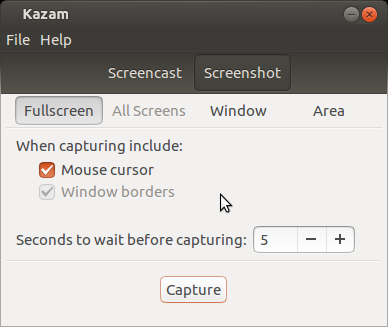
Selecting screenshot option
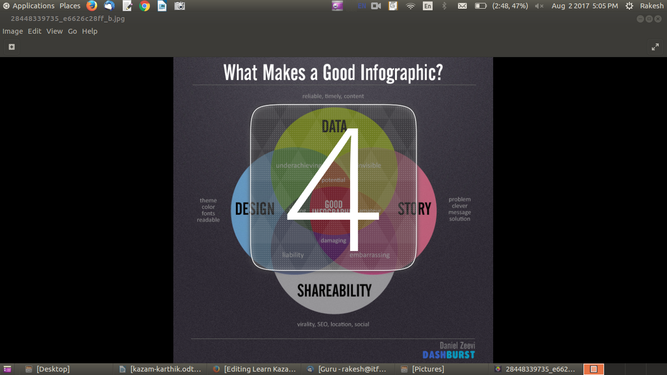
Delay count time for taking screenshot

After user opens kazam from menu, just click on the Screenshot option to take capture your computer screen as image. Here user can take screenshot in three modes like full screen, select window and select area. Users can choose
- Fullscreen when they want to take full computer screen as Screenshot, they can choose.
- Window when they want to take current window
- Area when they want particular area in the screen.
If users choose Area option, they have to drag cursor along particular area. Also users can choose whether to keep their Mouse cursor in their Screenshot and can choose to set capturing delay by few seconds before they actually start their Screenshot.
NOTE:- These options are same for both Screenshot and Screencast.
Saving and exporting

After selecting above options users can click on Capture to take Screenshot.
It will prompt users to choose location for save your screenshot. Users can also change the file name before saving.