Difference between revisions of "Learn Kanagram"
| Line 96: | Line 96: | ||
<gallery mode="packed" heights="200px" caption="Editing your vocabularies files"> | <gallery mode="packed" heights="200px" caption="Editing your vocabularies files"> | ||
| − | File:1. Kanagram kvtml file open with | + | File:1. Kanagram kvtml file open with gedit9.png|Open .kvtml file with option |
| − | File:2. Kanagrama kvtml | + | File:2. Kanagrama kvtml file10.png|Open .kvtml file by using gedit |
| − | File:3. Added words in | + | File:3. Added words in kanagram11.png|Adding words to vocabulary |
</gallery> | </gallery> | ||
#Presently you cannot edit new vocabularies in English, which you create from within Kanagram application. To do that, you need to do the following | #Presently you cannot edit new vocabularies in English, which you create from within Kanagram application. To do that, you need to do the following | ||
Revision as of 17:10, 26 April 2017

Introduction
Kanagram is a free and open source word game application. It has in-built word lists for different categories. A vocabulary editor is included, and the user can download other word lists and create their own word lists for existing or new categories.
Basic information
| ICT Competency | Kanagram is a free and open source application for creating subject (language) resources.
This tool can be used to strengthen language skills (vocabulary). |
| Educational application and relevance | Kanagram is an educational game that uses anagrams. It provides a set of jumbled letters and the user needs to guess what the original word is. There is no time limit or limitations at attempts, and a hint system is built in.
It can also be used to build general knowledge, by providing different examples of a category (such as different kinds of spices, or different festivals etc) |
| Version | Version - 1.2. It is a part of the Kde.edu package. |
| Configuration | No specific configuration requirements |
| Other similar applications | Tanglet |
| The application on mobiles and tablets | Anagram mobile applications for Android similar to Kanagram are available on Fdroid - AnagramSolver and Agram. |
| Development and community help |
|
Overview of Features
- Kanagram features several built-in word lists, hints, and feature which reveals the original word.
- Kanagram also has a vocabulary editor, so you can make your own vocabularies.
Installation
- The application is part of the Ubuntu custom distribution.
- In case you do not find it on your computer, you can install by typing
Kanagramon top search bar in Software Centre. - If you would like to install through the terminal follow these steps below:
- Open terminal by clicking Applications->System Tools->Terminal or through Keyboard shortcut
Ctrl+Alt+T - In the terminal window, type below command and press enter to start the installation by providing your machine password:
sudo apt-get install kanagram
- Open terminal by clicking Applications->System Tools->Terminal or through Keyboard shortcut
Working with the application
Kanagram interface
- Kanagram Interface
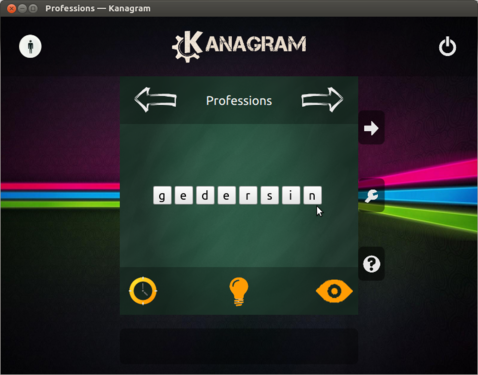
Kanagram home screen
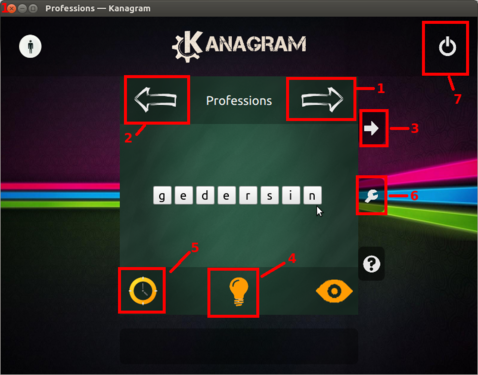
Kanagram menu
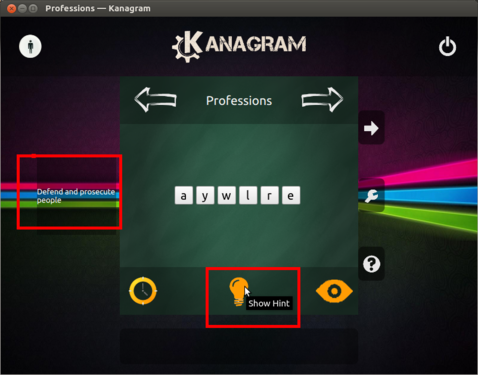
Hint for the jumbled word


- You can open Kanagram through Applications -> Education -> Kanagram. You will see this interface
- The Kanagram menu options / features are as follows (as per number indicated in the image)
- 1 and 2: use to change the vocabulary category.
- 3: It changes to next word
- 4: Hint key5: Timer : You can set timer for each word to complete
- 6: Configure Kanagram : You can add extra categories and words to it
- 7: Quit: exits from Kanagram
- 3. Hint key gives the hint for guessing the jumbled word. Hint will display in the right part of the screen.
Playing a word game
- Playing Word Game

Jumbled word
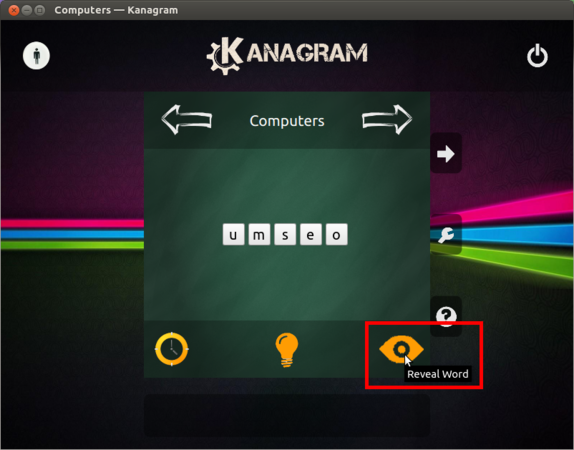
Correct word revealed


- If we type the correct word and press the Enter key, it will take you to the next word. If your guess is wrong, it will not go next word, manually you have to click on next.
- Reveal word - shows the answer (correct word is shown by arranging the jumbled words)
Creating your own word lists
Kanagram will allow you to create your own vocabularies files (word lists) and also you can edit it when you needed.
- Creating own word list
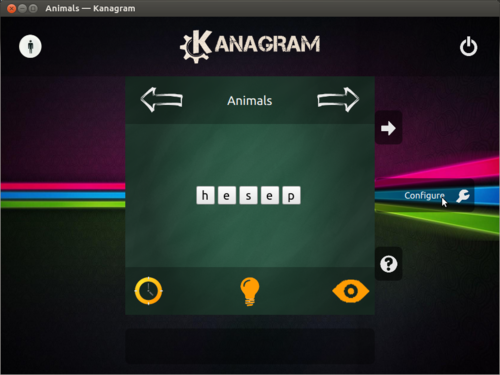
Open Kanagram configuration window
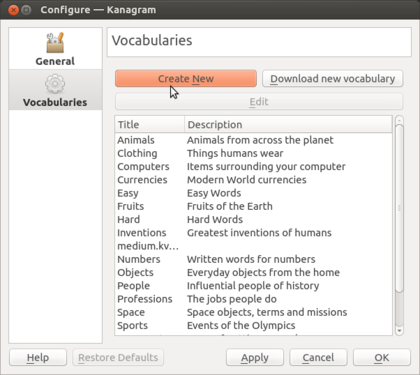
Creating vocabularies
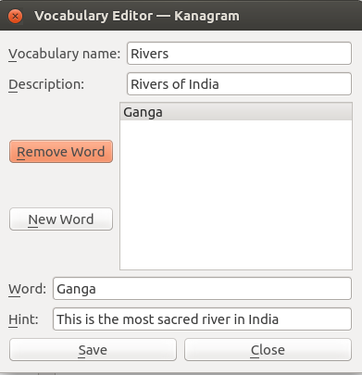
Add vocabularies words and hints


- Create your own vocabularies by clicking on Configure Kanagram -> Vocabularies.
- You can create vocabulary lists for new categories that you can create on Kanagram, such as 'Rivers of India' or 'Telangana districts' etc. To create 'Rivers of India', Click on "Create New" in Vocabularies. Here add Vocabulary name (Rivers) and description (Rivers of India). Then click on "New word". Now enter district name and hint. then click on "SAVE".
 |
Currently in Kanagram v1.2 which is shipped with Ubuntu 16.04, Kanagram is unable to use saved vocabularies created through above method unless you create a link to .local/share/kvtml folder inside .local/share/apps folder.
Also create |
- Editing your vocabularies files

Open .kvtml file with option
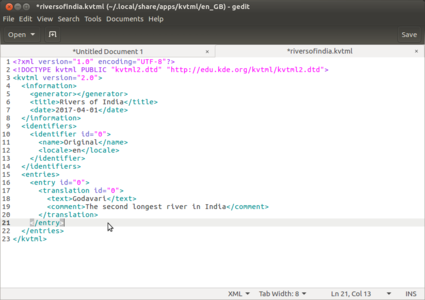
Open .kvtml file by using gedit

Adding words to vocabulary


- Presently you cannot edit new vocabularies in English, which you create from within Kanagram application. To do that, you need to do the following
- Go to
.local/share/apps/kvtml/enfolder. - Right click on your kvtml file and open with "gedit" (Application -> Accessories -> Text Editor).
- Copy the code as shown with box at 3rd image.
- Change
entry id, (increase the entry id by 1), add river name withintextand add hints withincomments. - In same way you can create any number of words for your vocabulary. You need to increase the entry id by another count of 1,every time.
- Save your gedit file in the above mentioned Kanagram folder and open Kanagram to view added word list.
- (Another option is to simply create a new list in Kanagram with the revised list of words)
- Go to
- Below is the sample entry for word in kvtml file:
<entry id="0">
  <translation id="0">
    <text>Word</text>
    <comment>hint</comment>
  </translation>
</entry>
Creating vocabulary in your local language (other than English)
- Creating local language vocabulary
- Adding words to local language vocabulary.png
Create local language vocabulary
- Kanagram edit file by gedit.png
Editing local language vocabulary
- Kanagram also supports Indian languages. You can create categories and word lists within a category. You can also provide 'hints' for each word. Currently the local language functionality is not working with complex words which are peculiar to Indian languages (like joint words or ottakshara). We currently can use Kanagram only for creating simple words in Telugu or other Indian languages. This issue may get solved in future upgrades of Kanagram.
- To edit new vocabularies which you create from within Kanagram application go to
.local/share/apps/kvtml/enfolder. Right click on your kvtml file and open with "gedit". Edit in the same manner explained in the earlier section.
While playing with local language vocabulary in Kanagram application, please select your language to type in Kanagram. To select your language, go to desktop top panel and click on "En" and choose "KaGaPa phonetic" keyboard.
Saving the files and formats
Not Applicable
Advanced features
None
Ideas for resource creation
You can use this to build quiz and question puzzles to learn language. You can also create word lists for concepts in other subjects.