Difference between revisions of "User:Rakesh"
Jump to navigation
Jump to search
| Line 6: | Line 6: | ||
| − | ===== | + | ===== 1. Added a Image with thumbline - left align - with caption - custom size ===== |
| − | [[File:COL_-_Google_Advanced_Search_for_OER_-_Usage_rights.png|left | + | [[File:COL_-_Google_Advanced_Search_for_OER_-_Usage_rights.png|left|450x450px|Specifying license in Google search settings|thumb]]<br> |
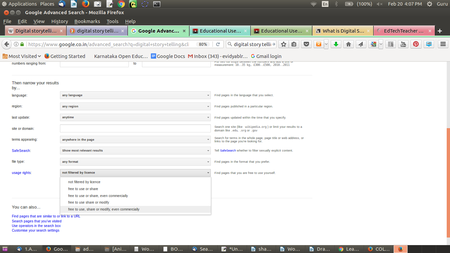
'''caption: Specifying license in Google search settings'''Search engines allow for search results to be filtered and displayed by license. You can do this by specifying OER as a criteria while setting your search preferences. In Google search you need to select <u>Settings → Advanced Search.</u> In Advanced Search, you can select Usage Rights as ‘free to use, share or modify, even commercially’ to get OER that you can re-use with or without modification. | '''caption: Specifying license in Google search settings'''Search engines allow for search results to be filtered and displayed by license. You can do this by specifying OER as a criteria while setting your search preferences. In Google search you need to select <u>Settings → Advanced Search.</u> In Advanced Search, you can select Usage Rights as ‘free to use, share or modify, even commercially’ to get OER that you can re-use with or without modification. | ||
| + | |||
| + | ===== 1. Added a Image with frame less - left align - with caption - custom size ===== | ||
| + | [[File:COL_-_Google_Advanced_Search_for_OER_-_Usage_rights.png|left|frameless|450x450px|flameless ]] | ||
| + | |||
| + | with | ||
| + | |||
| + | ===== 2. Added two Image with thumbline - left, right align - with caption - custom size ===== | ||
| + | [[File:COL_-_Google_Advanced_Search_for_OER_-_Usage_rights.png|left|450x450px|Specifying license in Google search settings|thumb]][[File:COL_-_Google_Advanced_Search_for_OER_-_Usage_rights.png|450x450px|Specifying license in Google search settings|thumb]] | ||
| + | |||
| + | ===== 3. Added Image within the box(used 2 box) -with thumbline - with table caption - custom size ===== | ||
| + | {| class="wikitable" | ||
| + | |+Give caption for table | ||
| + | |[[File:COL - Google Advanced Search for OER - Usage rights.png|thumb|450x450px|caption inserted ]]this is the just normal text I typed. | ||
| + | |'''caption: Specifying license in Google search settings'''Search engines allow for search results to be filtered and displayed by license. You can do this by specifying OER as a criteria while setting your search preferences. In Google search you need to select <u>Settings → Advanced Search.</u> In Advanced Search, you can select Usage Rights as ‘free to use, share or modify, even commercially’ to get OER that you can re-use with or without modification. | ||
| + | |} | ||
| + | |||
| + | ===== Added two Image with box - with caption(right one) - custom size, right and left alignment. ===== | ||
| + | {| class="wikitable" | ||
| + | ![[File:COL_-_Google_Advanced_Search_for_OER_-_Usage_rights.png|left|450x450px|Specifying license in Google search settings]] | ||
| + | ![[File:COL_-_Google_Advanced_Search_for_OER_-_Usage_rights.png|450x450px|Specifying license in Google search settings|thumb]] | ||
| + | |} | ||
Revision as of 13:17, 27 February 2017
1. Added a Image with thumbline - left align - with caption - custom size
caption: Specifying license in Google search settingsSearch engines allow for search results to be filtered and displayed by license. You can do this by specifying OER as a criteria while setting your search preferences. In Google search you need to select Settings → Advanced Search. In Advanced Search, you can select Usage Rights as ‘free to use, share or modify, even commercially’ to get OER that you can re-use with or without modification.
1. Added a Image with frame less - left align - with caption - custom size

with
2. Added two Image with thumbline - left, right align - with caption - custom size
3. Added Image within the box(used 2 box) -with thumbline - with table caption - custom size
| this is the just normal text I typed. | caption: Specifying license in Google search settingsSearch engines allow for search results to be filtered and displayed by license. You can do this by specifying OER as a criteria while setting your search preferences. In Google search you need to select Settings → Advanced Search. In Advanced Search, you can select Usage Rights as ‘free to use, share or modify, even commercially’ to get OER that you can re-use with or without modification. |
Added two Image with box - with caption(right one) - custom size, right and left alignment.
|
|---|