Difference between revisions of "Learn Google Form"
| (One intermediate revision by the same user not shown) | |||
| Line 40: | Line 40: | ||
# Add your question as shown | # Add your question as shown | ||
# Add your form title | # Add your form title | ||
| − | # To see | + | # To see question wise |
| − | # To see reposes | + | # To see reposes |
| − | # To change form settings | + | # To change form settings |
| − | # To choose question type | + | # To choose question type |
| − | # To add new question to the form | + | # To add new question to the form |
# Import question in the form using this button | # Import question in the form using this button | ||
# Add title and description | # Add title and description | ||
| − | # To add image | + | # To add image |
# Add video in the form using this button | # Add video in the form using this button | ||
| − | # To add new section | + | # To add new section |
==== Short answer question ==== | ==== Short answer question ==== | ||
| Line 72: | Line 72: | ||
a) Nagpur b) Shimla C) Bengaluru d) Amaravati <br> | a) Nagpur b) Shimla C) Bengaluru d) Amaravati <br> | ||
The participant can select any ONE answer since a Capital of a state is usually be only ONE. <br> | The participant can select any ONE answer since a Capital of a state is usually be only ONE. <br> | ||
| − | To add multiple choice question, choose multiple choice in question type | + | To add multiple choice question, choose multiple choice in question type. |
<gallery mode="packed" heights="300px"> | <gallery mode="packed" heights="300px"> | ||
File:Multiple que.png| Add multiple choice question | File:Multiple que.png| Add multiple choice question | ||
Latest revision as of 10:46, 19 May 2022
Introduction
Google form is platform created by google to collect data and to present, access it in a efficient way.
Basic information
| ICT Competency | Google form is to collect data and present it in efficient service developed by Google. |
| Educational application and relevance | We can use Google forms to collect student, teacher, information etc |
| Version | Not applicable |
| Configuration | No specific configuration requirements but Internet connection is needed to use this application. |
| Other similar applications | Lime survey |
| The application on mobiles and tablets | All our Android version mobile phones will have Google forms application which can be downloaded from playstore |
| Development and community help |
Working with Application
Introduction
- First step is to sign with your Google account in the web browser, Once you sign in click on Google apps button to access google forms
- Now click on blank to create new google form, now you can see the untitled form (Rename form as per your requirement)
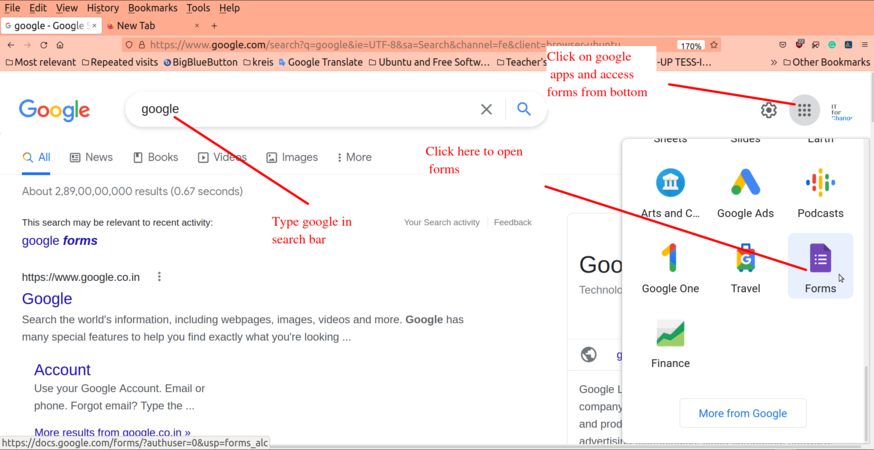
Google apps
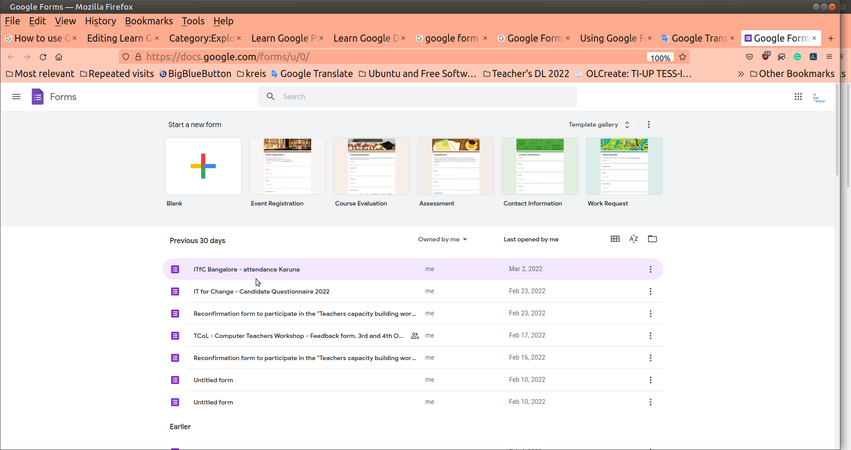
Access new or previously created Google forms
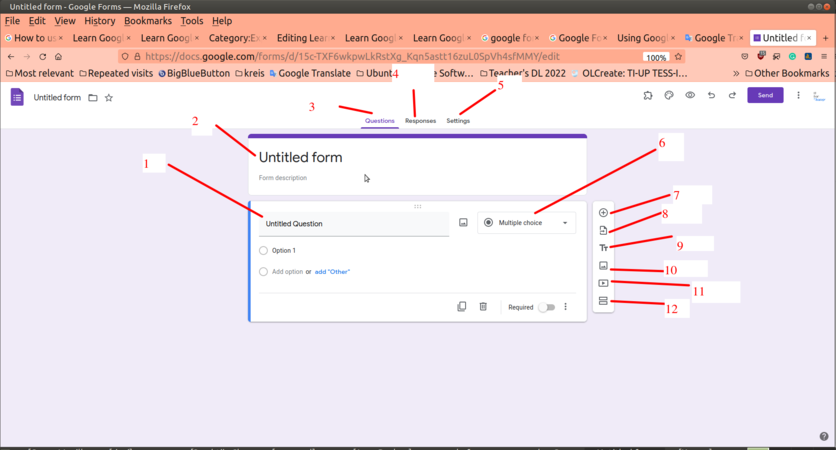
Google form interface


In the above image
- Add your question as shown
- Add your form title
- To see question wise
- To see reposes
- To change form settings
- To choose question type
- To add new question to the form
- Import question in the form using this button
- Add title and description
- To add image
- Add video in the form using this button
- To add new section
Short answer question
Short answers are those for which the participant can answer in one or two words to maximum of one sentence.
For example, Name of the person, their native place or any simple one line definition can be asked in this section.
To add short answer question, choose short answer type as in question type.
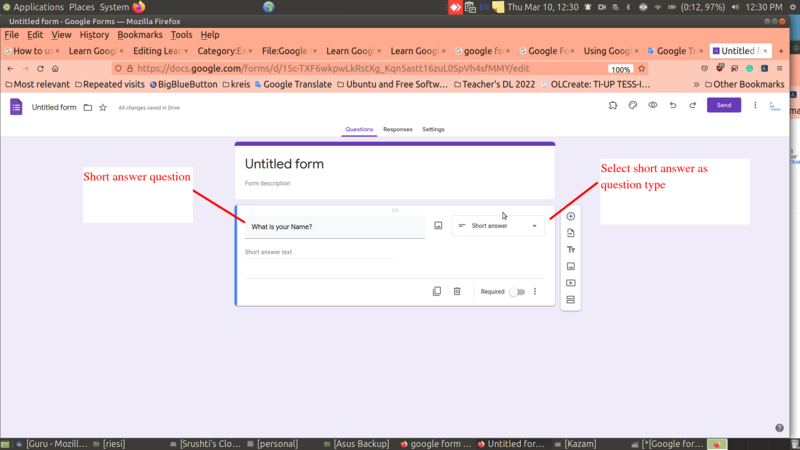
Add short answer question

Long answer questions
Long answers are required when the question need to be answered in a paragraph or many sentences.
For example,Enter your address, What are various types of computers, Describe your character etc. Here the participant should give the answer in more than one line.
To add long answer question, choose paragraph as in question type. Users can answer to this question in one or more paragraphs.
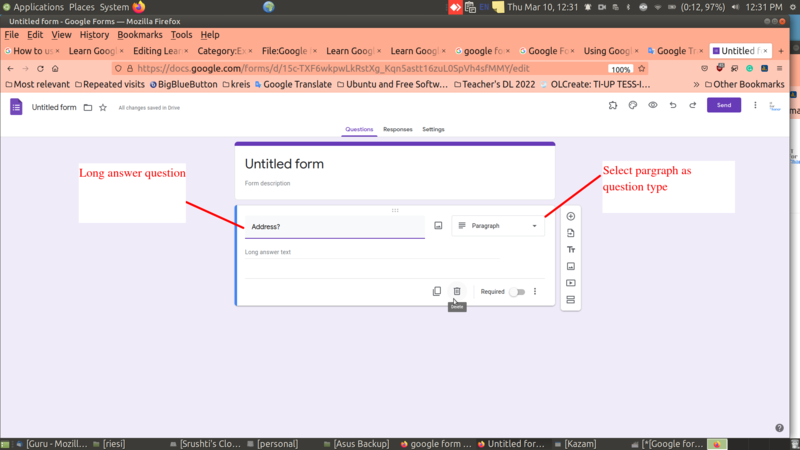
Add long answer question

Multiple choice question
Multiple choice questions are those for which the participant can give ONLY ONE answer.
For example, What is the capital of Karnataka?
a) Nagpur b) Shimla C) Bengaluru d) Amaravati
The participant can select any ONE answer since a Capital of a state is usually be only ONE.
To add multiple choice question, choose multiple choice in question type.
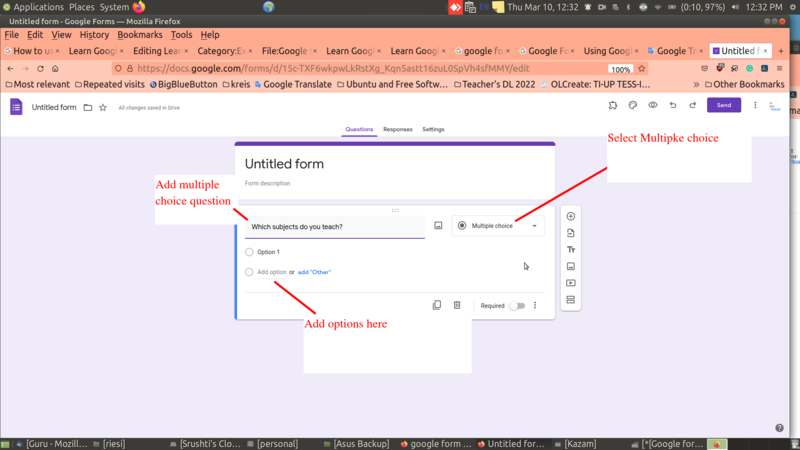
Add multiple choice question

Checkbox questions
Checkbox is a great choice when the participant can answer one OR more than one option in the list.
For example, What all subjects you studied in your matriculation?
a) Kannada b)Hindi c) Mathematics d) Science e) Social Science f) English
The answer here can be MORE THAN ONE because participant might have studied such number of subjects.
To add Checkbox question, choose Checkbox as in question type. Using this question type multiple answers can be chosen by users. Users can use single option or set of options or other as option using this type of question.
NOTE: Have a clarity about when to use Checkbox and Multiple Choice options. Checkbox is used for multiple selection of options whereas Multiple choice is used when you can select any one among the options.
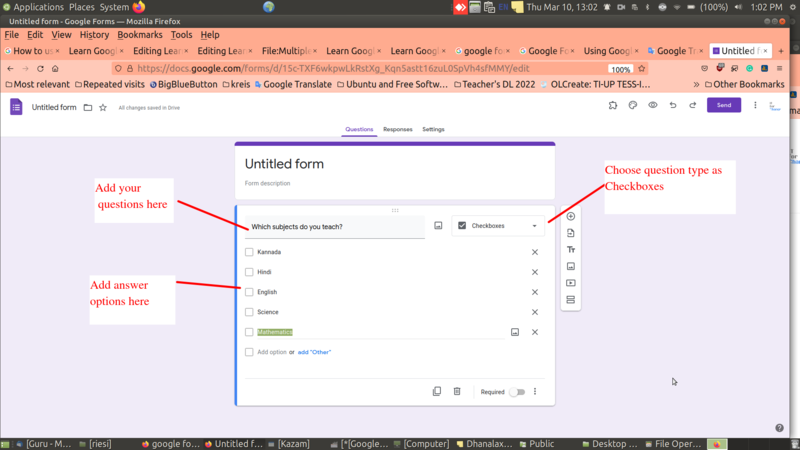
Checkbox question

Dropdown questions
Dropdown works similar to Multiple Choice options, which basically selects any ONE option in the list. Depending on the context of question you can select either Dropdown or Multiple choice options.
When you have to give very broader or lengthier options in such case it is better to use dropdown which saves the space as well as makes it clean presentation.
For example, Select your State
For this question, the options can be given in dropdown menu rather than multiple choice since it takes much space to display all the 28 states of India.
To add Dropdown question, choose Dropdown as in question type. Dropdowns can be useful to minimize the space covered in the form as all answers will be given dropdown. Users can use single option or set of options using this type of question.
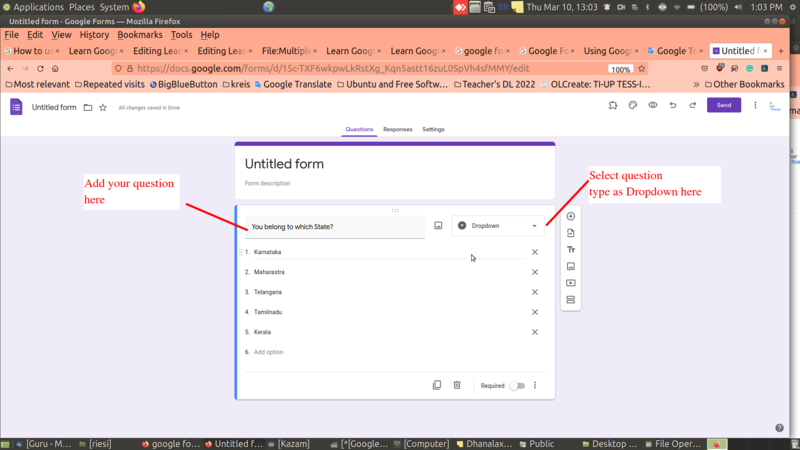
Dropdown question

File upload question
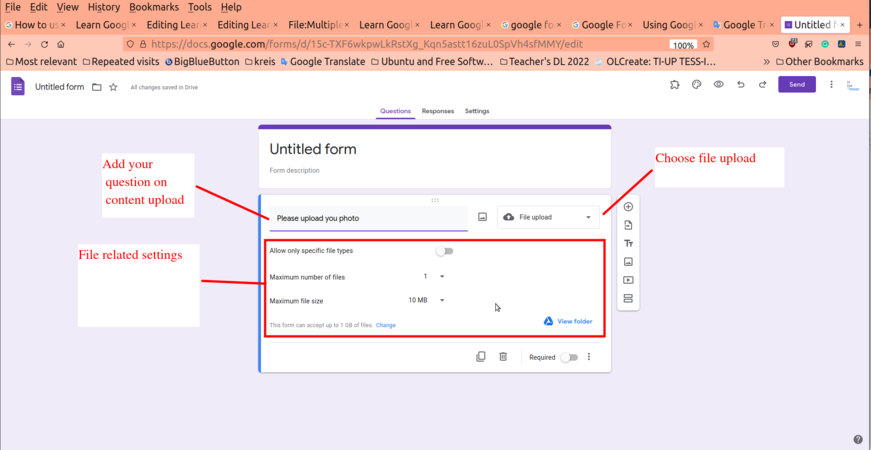
Sometimes it may be required to upload some documents to the form such as SSLC marks card, Photograph, Proof of address etc. In such situation you may need to give an option to upload the files onto the form.
To create upload file question, choose File upload in question type. File upload question can be useful as we can ask users to upload photo,signature, documents etc. Using this feature specific files can be uploaded.
File upload

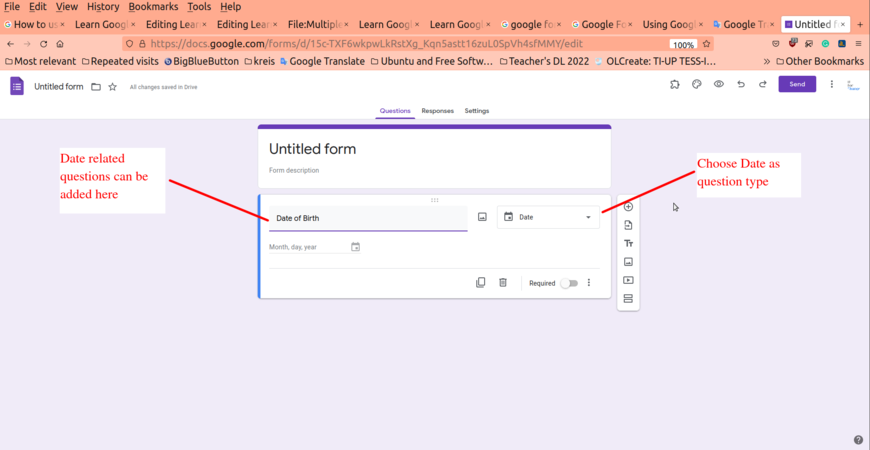
Date of birth is the common question found in the forms, which efficiently allows the participants to select the date, month and year in the given options. To add Date related question, choose Date in question type. Users can fill out specific dates asked by the creator. Specific date, month,year can be added.
Date related question

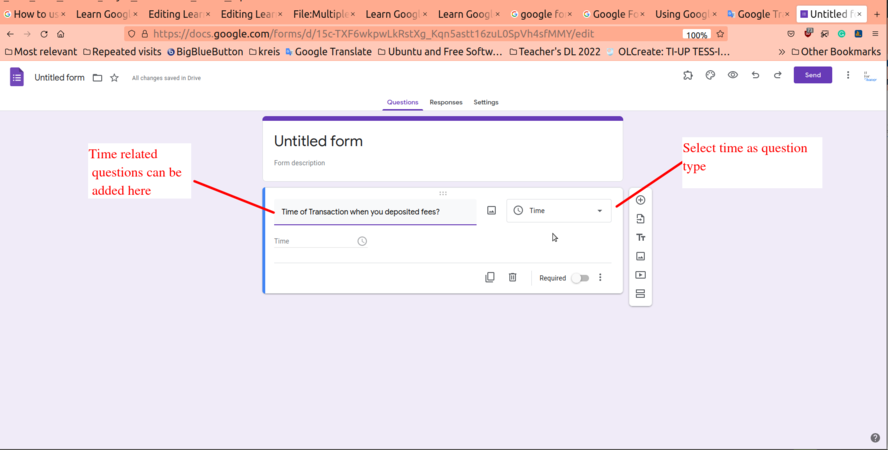
In case of any financial transaction that has happened, the timing of the transaction plays an important role in verification of the process. Therefore option of including time onto the form plays an important role. To add Time related question, choose Time in question type. Users can fill any specific time or duration using this question.
Time related question
